
Many buyers miss important details like hardware compatibility, build quality, and whether features match their actual needs until after the return period ends. You might overlook how well the processor, RAM, or graphics card handle your tasks or ignore the weight, battery life, and keyboard comfort that matter most for daily use. Focusing only on specs can lead to mismatched features and buyer’s remorse. Stick around to discover key tips that help you make a smarter choice before it’s too late.
Key Takeaways
- Buyers often overlook hardware performance testing beyond specs, leading to issues with demanding software post-purchase.
- Pre-installed software or bloatware may impact system speed, which is only noticeable after extended use.
- Portability features like battery life and build quality are frequently underestimated until real-world use.
- Essential features are sometimes misaligned with actual needs, causing unnecessary expenses that become apparent only later.
- In-store testing or thorough online reviews are crucial; issues may only surface after the return window closes.

Buying a Windows laptop can seem overwhelming with so many options available, but having a clear checklist can make the process much easier. One of your top priorities should be checking hardware compatibility. This means verifying that the laptop’s processor, RAM, graphics card, and storage meet your needs, whether you’re gaming, editing videos, or handling everyday tasks. Don’t just rely on specs; confirm that your intended software will run smoothly on the hardware. For example, if you work with demanding applications, you’ll want a machine with a powerful CPU and sufficient RAM. Conversely, for basic browsing and office work, a mid-range setup will suffice.
Another essential point often overlooked is the software pre-installed on the device. While manufacturers often include bloatware, you need to confirm that the essential software you need is already installed or easily accessible. Look for a clean, fresh version of Windows with minimal unnecessary apps. This not only saves you time but also guarantees your system runs efficiently right from the start. Keep in mind that pre-installed software can sometimes interfere with system performance, so it’s worth checking reviews or doing a quick clean install if needed. Additionally, understanding hardware requirements can help you select a device that truly fits your tasks.
Ensure the laptop has minimal pre-installed bloatware for optimal performance and efficiency from the start.
Beyond hardware compatibility and pre-installed software, pay attention to the build quality and portability. If you’re frequently on the go, a lightweight, durable chassis is a must. Check the battery life—don’t assume manufacturer claims; look for real-world reviews to see how long the battery lasts during typical use. Also, consider the keyboard and touchpad, especially if you’ll be typing for hours daily. Comfort and responsiveness can profoundly impact your overall experience. Additionally, considering ergonomic features can further enhance your comfort during long working sessions.
It’s easy to get caught up in tempting features—like high refresh rates or 4K screens—but make sure these align with your actual needs. Overspending on features you won’t use can leave you with a more expensive laptop that doesn’t add value to your day-to-day tasks. Remember, the return window is your last chance to test the device thoroughly. Once it closes, returning or exchanging can be a hassle, so take the time to assess everything carefully before making your decision. Testing the laptop in-store or through a detailed online review can help you identify potential issues early. This careful evaluation can help you avoid buyer’s remorse after your purchase.
In essence, focusing on hardware compatibility, software pre-installed, build quality, and your specific needs will help you avoid buyer’s remorse. A well-chosen Windows laptop can serve you reliably for years, but only if you scrutinize these critical factors during your purchase.
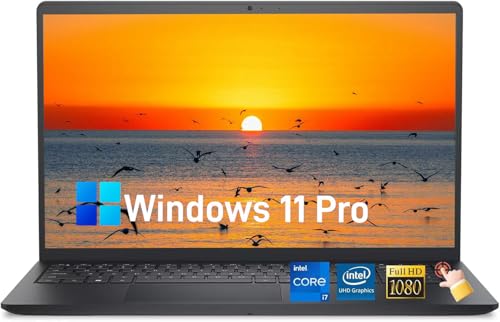
Dell 15 Laptop(2026), 15.6" FHD Touchscreen Display, 13th Gen Intel Core i7-1355U, Wi-Fi 6, Copilot AI, Type-C, 32 GB RAM, 1 TB SSD, Windows 11 Pro for Business & Student Traditional Laptop Computer
➤ [13th Gen Intel Core i7 Power] Power through demanding workloads with this Dell laptop featuring a 13th…
As an affiliate, we earn on qualifying purchases.
As an affiliate, we earn on qualifying purchases.
Frequently Asked Questions
How Important Is Battery Life for Daily Use?
Battery life is vital for daily use because good battery endurance guarantees your laptop stays powered longer without frequent charges. If you rely on your device for work or entertainment, you need a laptop with strong power longevity. Without it, you might find yourself tethered to a power outlet, which can disrupt your productivity and convenience. Prioritize battery performance to enjoy seamless, portable use throughout your busy day.
Can I Upgrade the RAM or Storage Later?
While it’s tempting to think you can easily upgrade your laptop later, not all models welcome such improvements gracefully. Many laptops have limited RAM compatibility and restricted storage expansion options, making upgrades tricky or impossible. If you anticipate needing more memory or space down the line, choose a model with accessible RAM slots and support for storage expansion now. This foresight guarantees your device remains flexible without costly upgrades.
What Warranty or Support Options Are Available?
You should check if the laptop offers an extended warranty or thorough customer support options. Many manufacturers provide extended warranties for extra coverage beyond the standard period, which can save you money on repairs. Also, consider the quality of customer support—look for reviews on responsiveness and helpfulness. Good warranty and support options give you peace of mind, ensuring help is available if your laptop encounters issues after the return window closes.
How Does Keyboard Comfort Affect Long-Term Use?
If your keyboard isn’t comfortable, it can turn your daily tasks into a torture test, affecting your long-term health. An ergonomic design that prioritizes typing ergonomics reduces strain on your wrists and fingers, preventing fatigue and injuries over time. Comfort is essential—if your keyboard feels off, you’ll struggle to stay productive and might even develop long-term issues. Prioritize a keyboard that feels natural to guarantee sustained, comfortable use.
Are There Compatibility Issues With Specific Software?
You might encounter software compatibility issues, especially with older or specialized programs not optimized for your Windows laptop’s version. Keep in mind, driver issues can also arise, causing hardware malfunctions or reduced performance. To avoid surprises, research your essential software’s compatibility beforehand and verify driver support for your specific model. Updating drivers and software regularly helps prevent problems and guarantees smooth operation after your return window closes.

Volher Laptop Backpack,Business Travel Anti Theft Slim Durable Laptops Backpack,Water Resistant College Computer Bag for Women & Men Fits 15.6 Inch Laptop and Notebook – Black
Storage Space & Pockets:One separate laptop compartment hold 15.6 Inch Laptop as well as 15 Inch,14 Inch and…
As an affiliate, we earn on qualifying purchases.
As an affiliate, we earn on qualifying purchases.
Conclusion
As the curtain falls on your laptop purchase, remember that the window of opportunity is fleeting—like a butterfly’s delicate flight. By ticking off every item on this checklist, you’re arming yourself with a sturdy shield against buyer’s remorse. Think of yourself as a seasoned sailor, charting a course through uncertain waters. When the return window closes, your decision will stand firm, a lighthouse guiding you safely home through the fog of tech confusion.

Light Gaming Laptop with AMD Ryzen7 7730U Processor(Up to 4.5GHz,8C/16T),16GB DDR4 RAM 512GB SSD, AMD Radeon Graphics,WiFi 6,15.6 inch IPS Display,Webcam, Windows 11 Laptop Computer for Video Editing
Efficient Processing Power: Powering this laptop is the AMD Ryzen 7 7730U Processor, boasting 8 cores, 16 threads,…
As an affiliate, we earn on qualifying purchases.
As an affiliate, we earn on qualifying purchases.

NIAKUN Laptop Computer,15.6 Inch Windows 11 Pro Laptops with Office 365,2026 Lap Top PC,8GB RAM 256GB SSD,Intel Pentium Process,1080P FHD,5000mAh Long Battery Life,2-Year Warranty,Business Student
【Unbeatable Assurance & Support for Your Laptop】Shop with confidence on this laptop on sale, backed by a 2-Year…
As an affiliate, we earn on qualifying purchases.
As an affiliate, we earn on qualifying purchases.