

Choosing the best professional 4K monitor for design teams involves balancing color accuracy, screen size, connectivity, and budget. The Dell 27 Plus 4K Monitor stands out as the overall top pick thanks to its sharp display and reliable performance. For those prioritizing larger screens, the LG 32UR500K-B offers impressive size and HDR support, while the Samsung ViewFinity S50GC balances features with affordability. Each of these options reflects different priorities, and the tradeoffs—such as price versus features—make the decision complex. Continue reading for a detailed comparison that will help you identify the ideal fit for your design team.
Key Takeaways
- High color accuracy and factory calibration are essential for professional design work, favoring monitors like the ProArt or LG models.
- Size matters; larger screens (32 inches and above) improve productivity but come with a higher price and desk space requirements.
- Connectivity options, including multiple ports and USB-C, are vital for seamless integration with modern workflows.
- HDR support enhances visual fidelity, especially for HDR workflows, but not all monitors implement it equally well.
- Price ranges vary widely; the best value monitors deliver a balance of features and affordability, while premium picks focus on color precision and build quality.




More Details on Our Top Picks
Dell 27 Plus 4K Monitor – S2725QS – 27-inch 4K (3840 x 2160) 120Hz IPS Display with AMD FreeSync Premium, sRGB 99%, Integrated Speakers, Ash White
The Dell S2725QS stands out for its vibrant 4K visuals with 99% sRGB coverage, making it ideal for detailed design work. Compared to the LG 27US500-W, it offers a higher refresh rate of 120Hz, which translates into smoother motion suited for interactive tasks or video editing. While the Dell’s limited HDMI ports and absence of USB-C might restrict connectivity options, its combination of color fidelity and rapid refresh makes it a versatile choice for professional creatives. The built-in speakers and sleek design add value, but the lack of advanced input options means users with modern devices might need adapters. Overall, this monitor makes the most sense for designers seeking sharp visuals with fast response times without a hefty premium.
Pros:- Vivid 4K visuals with 99% sRGB coverage
- 120Hz refresh rate for smooth performance
- Blue light reduction with ComfortView Plus
Cons:- Limited to two HDMI ports, reducing connection flexibility
- No USB-C port for newer laptops and devices
- Speakers may not satisfy audiophiles
Best for: Creative professionals who prioritize color accuracy, fast refresh, and a clean aesthetic in their workspace
Not ideal for: Designers needing extensive connectivity options like multiple USB-C ports or built-in SD readers
- Display Size:27 inches
- Resolution:3840 x 2160 pixels (4K)
- Refresh Rate:120Hz
- Response Time:0.03ms
- Panel Technology:IPS
- Color Gamut:99% sRGB
Bottom line: This model suits high-precision design work paired with smooth motion, ideal for those who value color fidelity and modern aesthetics.
LG 32UR500K-B 32-Inch 4K UHD HDR10 Monitor with Built-in Speakers and OnScreen Control
The LG 32UR500K-B offers a sizable 32-inch display with excellent color support, perfect for multitasking and detailed creative work. Its HDR10 compatibility enhances contrast and color depth, making it well-suited for color-sensitive tasks compared to smaller monitors like the Dell S2725QS. While its 60Hz refresh rate isn’t ideal for fast-paced editing or gaming, the ergonomic stand and adjustable tilt help tailor the viewing experience. Unlike the Samsung UJ59, which has a VA panel with deeper contrast, LG’s IPS panel provides wider viewing angles, a plus for collaborative work. However, its limited ports and the need for software to access advanced controls could curb flexibility. It’s best for creative teams prioritizing a larger workspace with accurate colors and ergonomic comfort.
Pros:- Large 32-inch 4K display enhances productivity
- HDR10 support improves color and contrast
- Adjustable tilt stand for ergonomic comfort
Cons:- Only 60Hz refresh rate limits motion clarity for fast editing
- Requires software installation for full control features
- No USB-C port for modern connectivity
Best for: Designers and teams who need a large, color-accurate display with ergonomic flexibility
Not ideal for: Fast-paced video editors or gamers requiring higher refresh rates for motion clarity
- Display Size:32 inches
- Resolution:3840 x 2160 (4K UHD)
- Display Technology:VA LED
- Contrast Ratio:1000:1
- Brightness:250 nits
- Ports:HDMI x2, DisplayPort
Bottom line: This monitor is ideal for creative professionals seeking a large, color-accurate workspace with ergonomic adjustments, but not for fast-motion tasks.
Samsung 32-Inch UJ59 Series 4K UHD Computer Monitor, VA Panel, HDMI, DisplayPort, Eye Saver/Flicker-Free Mode, FreeSync, LU32J590UQNXZA, Black
The Samsung UJ59 provides a vibrant 4K display with over a billion colors, making it a strong choice for detailed design work at an accessible price point. Its VA panel offers deep contrast, similar to the LG 32UR500K-B, but with narrower viewing angles, which might be a drawback for collaborative environments. Features like FreeSync and Eye Saver Mode enhance user comfort during long sessions, but its limited connectivity (only HDMI and DisplayPort) could restrict modern device compatibility. Compared to the LG, it excels in contrast but falls short on wide viewing angles and advanced ports. It’s a solid choice for users who prioritize color depth and multitasking features without the need for high refresh rates or extensive connectivity.
Pros:- Over a billion colors for vibrant, detailed images
- Deep VA panel contrast enhances visual depth
- Supports multitasking with PBP and PIP
Cons:- Limited viewing angles on VA panel
- No built-in speakers listed
- Restricted connectivity options
Best for: Designers needing a large, color-rich display with deep contrast for detailed work and multitasking
Not ideal for: Fast-paced multimedia editing or gaming requiring higher refresh rates and broader connectivity
- Screen Size:32 inches
- Resolution:3840×2160 (4K UHD)
- Panel Type:VA
- Contrast Ratio:1000:1
- Brightness:250 nits
- Inputs:HDMI 2.0 x2, DisplayPort
Bottom line: This monitor suits users who want rich colors and deep contrast at a friendly price but don’t need wide angles or ultra-fast refresh rates.
LG 27US500-W 27-Inch 4K UHD IPS Monitor with HDR10 and Adjustable Stand
The LG 27US500-W provides a reliable 27-inch 4K IPS display with HDR10 support, emphasizing accurate colors and wide viewing angles. Compared with the Dell S2725QS, it offers similar resolution with a slightly more affordable price point, but with a lower refresh rate of 60Hz. It’s suited for professionals who need a balance of vivid imagery and comfortable ergonomics, especially when desk space is limited. The lack of built-in speakers and the requirement for software to access full control features are minor inconveniences. Its wide viewing angles make it particularly suitable for collaborative creative work, though it’s less appropriate for high-frame-rate tasks like fast video editing or gaming.
Pros:- High-resolution 4K UHD with accurate color reproduction
- HDR10 support for enhanced contrast and color
- Adjustable tilt stand for ergonomic comfort
Cons:- Limited to 60Hz refresh rate, not suited for fast-paced work
- No built-in speakers
- Requires software for full menu access
Best for: Designers and professionals requiring precise colors and ergonomic flexibility in a compact monitor
Not ideal for: Fast-motion editing or gaming that benefits from higher refresh rates
- Display Size:27 inches
- Resolution:3840 x 2160 (4K UHD)
- Display Technology:IPS
- Contrast Ratio:1000:1
- Brightness:300 cd/m²
- Ports:2 HDMI, 3 DisplayPort
Bottom line: This monitor offers a balanced mix of color accuracy and ergonomic features, perfect for detailed design work in limited spaces.
Samsung 34″ ViewFinity S50GC Series Ultra-WQHD Monitor, 100Hz, HDR10, AMD FreeSync, Eye Care, Borderless, PIP/PBP, Black
The Samsung ViewFinity S50GC offers a wide 34-inch Ultra-WQHD display with a 21:9 aspect ratio, ideal for multitasking and detailed visual work. Its 100Hz refresh rate and HDR10 support provide smooth visuals and vibrant colors, making it suitable for extended creative sessions. Unlike the smaller 27-inch options, this monitor’s expansive screen real estate is unparalleled for managing multiple windows and complex workflows. The borderless design and multiple input options, including PIP and PBP, enhance productivity. However, its size may be unwieldy on small desks, and it’s more expensive than standard 4K options. Compared to the LG 32UR500K-B, it sacrifices some portability for a broader workspace, perfect for those needing an immersive, multi-window environment.
Pros:- Wide 21:9 aspect ratio for multitasking and immersive viewing
- High color accuracy with HDR10 and billion-color support
- Eye care features reduce eye strain during long hours
Cons:- Expensive and may be too large for small desks
- Requires compatible graphics hardware for PBP and PIP features
- Limited availability of ports compared to smaller monitors
Best for: Creative teams and professionals who benefit from a large, immersive workspace for multitasking and detailed projects
Not ideal for: Users with limited desk space or those who do not require ultra-wide screens for their workflows
- Screen Size:34 inches
- Resolution:3440 x 1440
- Refresh Rate:100Hz
- Response Time:5ms
- HDR:HDR10
- Inputs:2 HDMI 2.2, 1 DisplayPort
Bottom line: This ultra-wide monitor is best for professionals who need extensive workspace for multitasking and detailed design, accepting its larger size and cost.
LG 27G810A-B 27-inch Ultragear 4K UHD IPS Gaming Monitor, Dual Mode 180Hz/360Hz, 1ms, G-Sync, FreeSync Premium, HDR400, HDMI 2.1
The LG 27G810A-B stands out for its dual mode capability, offering both 180Hz at 4K and up to 360Hz at FHD, making it uniquely suited for those who need a monitor that can switch seamlessly between professional design work and high-end gaming. Unlike the Samsung ViewFinity S7, which prioritizes color accuracy for creative tasks, this LG excels in responsiveness and refresh rates, though it sacrifices some color calibration precision. Its fast 1ms response time and adaptive sync technology reduce motion blur, beneficial for dynamic workflows or creative video editing. The premium features come at a higher price, and the headphones need to be purchased separately. This is ideal for design teams that also value gaming or fast-paced multimedia tasks without compromising on visual quality.
Pros:- Dual mode with 180Hz 4K and 360Hz FHD for flexible performance
- Vivid 95% DCI-P3 color coverage with HDR400 support
- Fast 1ms response time enhances motion clarity
- Fully adjustable ergonomic stand
Cons:- Headphones sold separately, adding extra cost
- Actual refresh rate may vary depending on system compatibility
- Premium price point may not fit tighter budgets
Best for: Designers who require a versatile display capable of handling both high-end gaming and detailed visual work.
Not ideal for: Purely professional creators who prioritize color accuracy and calibration over high refresh rates, as the gaming focus may lead to calibration compromises.
- Size:27 inches
- Resolution:3840 x 2160 (4K UHD)
- Refresh Rate:180Hz (4K mode), 360Hz (FHD mode)
- Response Time:1ms GtG
- Panel Type:IPS
- HDR:DisplayHDR 400
Bottom line: This monitor suits design teams needing high responsiveness and versatility for both creative and gaming applications.
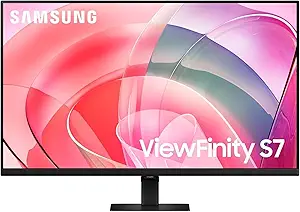
Samsung 27-Inch ViewFinity S7 (S70D) Series 4K UHD Monitor with HDR10, Multiple Ports, and Eye Care
The Samsung ViewFinity S7 is tailored for creative professionals who value a high-quality display with excellent connectivity options and eye care features. It offers vibrant 4K UHD visuals with HDR10, comparable to the LG 27UP650K-W, but enhances user comfort with TÜV-certified eye care and an easy, tool-free setup. While it lacks the advanced color gamut of some premium models, its ergonomic stand with tilt, height, and pivot adjustments makes long work sessions more comfortable. The monitor’s straightforward setup and multiple ports support a clutter-free workspace, but the higher price tag may deter budget-conscious buyers. It’s best suited for teams focused on detailed visual tasks and extended use without the need for ultra-wide color gamuts or ultra-high refresh rates.
Pros:- Vivid 4K UHD with HDR10 for rich visuals
- Multiple connectivity options including USB ports
- Ergonomic stand with multiple adjustments
- TÜV-certified eye care technology
Cons:- Premium pricing may limit accessibility
- Limited stand adjustment features beyond tilt, height, and pivot
- No built-in speakers for convenience
Best for: Designers and creators who prioritize connectivity and ergonomic comfort for long work hours.
Not ideal for: High-end color grading professionals needing precise calibration or ultra-wide color gamuts, as this model emphasizes versatility and comfort over extreme color accuracy.
- Size:27 inches
- Resolution:3840 x 2160 (4K UHD)
- HDR:HDR10
- Ports:HDMI, DisplayPort, USB-A, USB-B
- Stand:Tilt, Height, Pivot adjustments
- Certification:TÜV eye care
Bottom line: This monitor is ideal for creative teams seeking a versatile, comfortable display with excellent connectivity.
ASUS ROG Strix 27” 4K HDR400 USB-C Gaming Monitor (XG27UCS)
The ASUS ROG Strix XG27UCS is designed for those who need both superb visuals and quick response times, making it suitable for professional gamers and multimedia creators alike. Its 160Hz refresh rate with a 1ms GTG response time delivers smooth motion, outperforming many 4K monitors that often settle for 60Hz. The 130% sRGB color gamut rivals some color-accurate displays, but it’s primarily optimized for gaming and fast-paced content. Compared with the LG 27G810A-B, which emphasizes dual modes for gaming and design, the ASUS focuses on low latency and connectivity, including USB-C for flexible setup. The heavier weight and limited HDMI ports could be drawbacks for some users. This makes it best for design teams who also need a high-performance gaming monitor with excellent color fidelity.
Pros:- High-resolution 4K with 160Hz refresh rate
- 1ms GTG response time for smooth visuals
- USB-C connectivity for easy device connection
- Low motion blur with ELMB SYNC technology
Cons:- Limited HDMI ports, which could restrict device connections
- Relatively heavy at 14.5 pounds for a desk setup
- Premium price may limit affordability
Best for: Designers involved in game development or multimedia projects who require quick response and vibrant visuals.
Not ideal for: Purely professional designers who need maximum color accuracy and calibration options, as the focus is on speed and responsiveness rather than color precision.
- Size:27 inches
- Resolution:3840 x 2160 (4K UHD)
- Refresh Rate:160Hz
- Response Time:1ms (GTG)
- Display Technology:Fast IPS LCD
- Color Gamut:130% sRGB
Bottom line: This monitor excels for design teams that value rapid response and vibrant display qualities, blending gaming performance with creative work.
Samsung 27″ ViewFinity S8 (S80D) Series 4K UHD Computer Monitor with HDR10, Multiple Ports, Height Adjustable Stand, 2024 Model
The Samsung ViewFinity S8 (S80D) combines high-resolution visuals with advanced ergonomics and connectivity, making it a compelling choice for creative teams aiming for adaptability and longevity. Its HDR10 support rivals the LG 27UP650K-W in visual quality, but the standout feature is the fully adjustable stand with height, tilt, swivel, and 90° pivot, supporting diverse workspace setups. Its 3-year warranty and 2024 model status suggest a focus on durability and future-proofing. While the premium price may be a barrier for some, its combination of 4K clarity, flexible positioning, and eye care makes it suitable for long hours of professional use, especially for designers who need to adjust their workflow frequently.
Pros:- High-resolution 4K UHD with HDR10
- Height, tilt, swivel, and pivot adjustments for ergonomic comfort
- Multiple ports including HDMI, DisplayPort, USB-A, USB-B
- 3-year warranty and modern design
Cons:- Premium price may limit accessibility
- Limited details on integrated features like built-in speakers
- Requires compatible devices for full functionality
Best for: Designers and creators who prioritize ergonomic flexibility and future-proof features in their workspace.
Not ideal for: Budget-conscious individuals or those who do not need extensive adjustability, as the higher cost may not be justified for basic needs.
- Size:27 inches
- Resolution:3840 x 2160 (4K UHD)
- HDR:HDR10
- Ports:HDMI, DisplayPort, USB-A, USB-B
- Stand:Height adjustable, swivel, tilt, pivot
- Warranty:3 years
Bottom line: This monitor is ideal for design teams seeking a highly adjustable, future-ready display with excellent visual quality.
ASUS ProArt Display 27” 5K HDR Professional Monitor (PA27JCV)
The ASUS ProArt PA27JCV stands out for its stunning 5K resolution and exceptional color accuracy, making it ideal for detailed design work. Compared to the LG 27US500-W, which offers 4K resolution at a lower price, the PA27JCV’s higher pixel density provides sharper images and more precise detail critical for professional creatives. Its factory-calibrated display covers 99% DCI-P3 and 100% sRGB, ensuring color consistency straight out of the box—an essential feature for color-critical workflows. The inclusion of a USB-C port with 96W power delivery simplifies desk setup, and auto-adjusting brightness and color temperature improve ease of use in varying lighting conditions. However, the premium price tag makes it less accessible for smaller studios or hobbyists, and its 60Hz refresh rate isn’t suited for fast-paced video editing or gaming. Its large footprint demands ample desk space, which could be a concern in smaller offices. This pick makes the most sense for high-end design teams needing ultra-high resolution and top-tier color fidelity.
Pros:- Exceptional 5K resolution delivering sharp, detailed images
- Factory-calibrated with wide color gamut (99% DCI-P3, 100% sRGB)
- Versatile connectivity including USB-C with 96W power delivery
- Auto brightness and color temperature adjustments for consistent display quality
Cons:- High price point may be prohibitive for smaller teams or individual users
- Limited refresh rate of 60Hz not suitable for fast-paced video editing or gaming
- Large size requires significant desk space
Best for: Professional content creators and design teams requiring ultra-high resolution and precise color accuracy.
Not ideal for: Small studios or freelance designers with limited budgets who don’t need 5K resolution or extensive connectivity.
- Display Size:27 inches
- Resolution:5120 x 2880 (5K HDR)
- Display Type:LED LCD
- Panel Type:IPS
- Color Gamut:99% DCI-P3, 100% sRGB, 95% Adobe RGB
- Brightness:400 cd/m²
- Contrast Ratio:3000:1
- Ports:1 HDMI, 4 USB 3.0, 3 component outputs, USB-C with PD 96W
- Auto Sensors:Ambient light and backlight sensors
Bottom line: This monitor is perfect for high-end design teams prioritizing resolution and color accuracy over budget and refresh rate considerations.

How We Picked
Our evaluation focused on key factors that matter most to design professionals: display quality, color accuracy, size, connectivity, and build quality. We prioritized monitors with high-resolution 4K panels, excellent color reproduction (covering sRGB and AdobeRGB), and robust calibration features. Performance aspects such as refresh rate and adaptive sync were considered but secondary, since most design work benefits from stable and accurate visuals rather than gaming speed. We also assessed usability features like ergonomic adjustments and port options, ensuring each model suits a professional environment. The ranking reflects a combination of these factors, emphasizing value for design teams who need reliable, precise displays without unnecessary extras.
Factors to Consider When Choosing Best Professional 4K Monitor For Design Teams
Selecting the right 4K monitor for a design team involves understanding several key considerations. Beyond raw specifications, factors like color accuracy, ergonomic features, and connectivity impact daily workflow and output quality. Making the wrong choice can lead to inconsistent colors, discomfort, or limited compatibility, hampering productivity. Here are the main areas to focus on when choosing a professional 4K display.Color Accuracy and Calibration
For design work, color fidelity is paramount. Look for monitors that come pre-calibrated or support hardware calibration tools, and aim for panel technologies like IPS that provide consistent color from wide viewing angles. Monitors covering at least 99% sRGB and supporting AdobeRGB or DCI-P3 are ideal for ensuring your work displays accurately across different devices and media. Overlooking calibration features can result in mismatched colors, forcing you to spend extra time adjusting images or risking client dissatisfaction.
Size and Resolution
While 27-inch screens are common, larger 32-inch or ultrawide monitors can significantly boost productivity by providing more workspace. Higher resolution ensures sharp details, which is essential for pixel-level editing. However, larger screens and higher resolutions often come with increased costs and may demand more powerful graphics hardware. Balance your available desk space and budget against your need for detail and screen real estate to avoid overinvesting in features you won’t utilize fully.
Connectivity and Ergonomics
Multiple ports, especially USB-C and Thunderbolt, simplify connecting peripherals and reduce cable clutter. Adjustable stands and ergonomic features like tilt, swivel, and height adjustments help prevent strain during long work sessions. Monitors lacking these features may cause discomfort or force you to compromise on workspace setup. Ensuring flexibility here can enhance comfort and workflow integration, especially in collaborative environments.
HDR and Visual Fidelity
HDR support enhances contrast and color depth, making it valuable for specific design workflows, especially in visual effects or video editing. However, not all HDR implementations are equal; some monitors offer better tone mapping and color reproduction than others. Over-investing in HDR features on a display with limited brightness or poor local dimming can lead to disappointing results. Consider your specific HDR needs and whether your workflow truly benefits from this feature.
Price and Overall Value
Design teams should evaluate whether higher-priced models deliver meaningful advantages in color accuracy, build, and features. Budget options may lack calibration or have narrower color gamuts, reducing their effectiveness for professional work. Conversely, premium monitors often come with extensive calibration tools, better materials, and additional features that justify the cost. Identify your core needs and allocate funds toward features that directly impact your output quality and comfort.
Frequently Asked Questions
Is a 4K monitor really necessary for design work?
While not strictly necessary, a 4K monitor provides significantly sharper images and more screen real estate, which can enhance precision and productivity. For detailed design tasks such as photo editing, illustration, or layout work, the increased resolution makes a notable difference. However, it also requires a capable graphics card and can be more expensive. If your work involves high-detail projects or you need space for multiple windows, a 4K monitor becomes a worthwhile investment.
How important is color coverage like AdobeRGB or DCI-P3?
Color coverage directly affects how accurately your monitor displays colors. For professional designers, especially those working in print or video, wider gamuts like AdobeRGB or DCI-P3 are highly desirable. They enable more vibrant and true-to-life colors, which are crucial for client approval and consistent output. Monitors with limited color coverage may cause your work to look different on other devices or media, leading to potential rework or miscommunication.
Should I prioritize size or resolution when choosing a monitor?
Both matter, but resolution often has a greater impact on image detail and workspace. A 27-inch 4K monitor offers a sharp, detailed display, while a larger 32-inch screen provides more physical workspace, which can be helpful for multitasking. If you have sufficient desk space and need to see more at once, a larger monitor could be more productive. Conversely, if pixel-level detail is critical, prioritize resolution—higher resolution on a smaller screen can sometimes outperform a larger, lower-resolution display.
Are gaming monitors suitable for professional design work?
Many gaming monitors feature high refresh rates and adaptive sync, which can be beneficial for smooth motion and reduced input lag. However, they often emphasize speed over color accuracy, which can compromise fidelity. If a gaming monitor supports good color coverage and calibration, it can serve well for design tasks. Nonetheless, dedicated professional monitors typically provide better color accuracy and calibration options, making them more reliable choices for color-critical work.
What is the best budget-friendly 4K monitor for design teams?
Budget-conscious professionals should look for monitors that offer solid color accuracy, good resolution, and reliable connectivity without the premium price tag. While budget options may lack some advanced calibration features, many still provide high sRGB coverage suitable for most design tasks. Pay attention to reviews on color fidelity and build quality, as cheaper models may compromise on these aspects. Investing in a well-reviewed budget model can deliver good value without sacrificing essential performance.
Conclusion
The best overall pick for design teams remains the ProArt Display 27” for its outstanding color accuracy and factory calibration, suited for professional editing and creative workflows. The LG 32UR500K-B provides excellent size and HDR support at a more accessible price, making it ideal for larger workspace needs. For those seeking premium quality and the most precise colors, the ASUS ProArt PA27JCV offers exceptional calibration and build. Beginners or small teams on a budget should consider the Samsung UJ59 for its affordability and decent performance. If you need a monitor that balances features with value, these options cover the broad spectrum of professional design requirements.