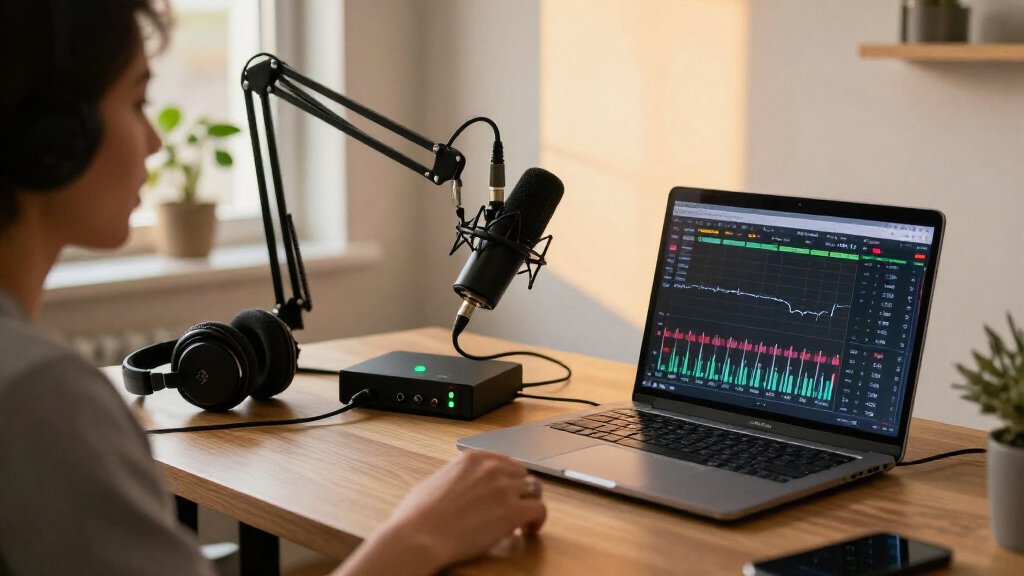
This checklist is for small business owners who want to start a podcast or improve a simple recording setup. It covers six pieces of gear for capturing a voice, monitoring audio, and recording in a studio or on location. Choose around your workflow, including how many people need to speak and where you plan to record.

Get business pricing on office and shipping supplies
- Business-only prices and quantity discounts
- Tax-exempt purchasing
- Multiple users, one account, clear invoices
The sections move from the microphone to the supporting equipment: an audio mixer, headphones, boom arm, acoustic foam panels, and portable recorder. Each slot explains its role, points out common fit and compatibility questions, and ends with a pick-specific verdict. Think of the list as a system: each item should fit the way you intend to record.
Use the “look for” points to compare options before buying. Check connection types, placement, comfort, and whether the item suits your recording space and routine. Confirm compatibility first, especially when combining USB, XLR, mixer, and recorder equipment. You can start with the items that address your biggest recording need and add the rest as your setup develops.
USB Podcast Microphone
A microphone is the first decision because it shapes how a host speaks into the recording setup. The Shure MV7+ is named as a USB-C and XLR dynamic microphone, so the connection you plan to use matters. Before buying, decide whether you want to connect directly to a computer over USB-C or build around an XLR connection and compatible equipment. Match the connection to your workflow rather than assuming every cable or device will work together.
Common mistakes include overlooking the connection at the other end, forgetting to plan for where the mic will sit, or choosing a setup that feels awkward for the host. Check the included stand against your desk and recording position, and consider whether a boom arm would better fit your space. The product name identifies the microphone as dynamic, but it does not specify every accessory or compatibility detail; confirm those in the listing before purchase. Plan placement and connections before settling on a complete setup.
What to look for:
- Confirm the USB-C and XLR connections suit your recording equipment.
- Check which cables and accessories are included.
- Consider whether the included stand fits your desk and speaking position.
- Plan for a boom arm if you need adjustable microphone placement.
- Verify the microphone works with your chosen computer, mixer, or recorder.
Shure MV7+ USB-C and XLR Podcast Dynamic Microphone with Stand, Black

The Shure MV7+ is a dynamic microphone for podcasting, streaming, recording, and remote work, with USB-C and XLR connectivity. It features voice isolation, real-time noise reduction, auto level adjustment, a digital pop filter, and a customizable LED touch panel with mute control.
Pros:
- Offers both USB-C and XLR connectivity.
- Voice isolation and real-time noise reduction help reduce background sound.
- Auto Level Mode adjusts gain based on voice volume and distance.
- LED touch panel provides customizable lighting, level monitoring, and mute control.
Cons:
- Requires a corded power connection.
- Listed operating system compatibility is limited to Windows 10 and macOS 12.
Best for: Hosts who want USB-C and XLR connection options
Not ideal for: Buyers who need a specific accessory not confirmed in the listing
Bottom line: Choose the MV7+ when its USB-C or XLR connection and included stand fit your planned recording setup.
Audio Mixer
A mixer can serve as the center of a podcast workflow when you want to bring audio equipment together. The RØDE RØDECaster Pro II is described as an all-in-one audio production studio, making it a candidate for buyers who want a dedicated production unit. Start by listing the sources you need to connect, such as microphones and any other audio inputs, then compare those needs with the product’s documented connections and controls. Let your source list guide the choice.
A frequent buying mistake is assuming that “all-in-one” automatically means a particular device, accessory, or recording method is supported. Confirm compatibility with your microphones, computer, and intended recording process, and check whether required cables are included. If more than one person will record, verify the setup can accommodate the planned participants and their equipment. Also consider how the unit will fit on your work surface and whether its operation suits the people who will use it. Check the actual connection needs before treating it as the hub of your setup.
What to look for:
- Compare the documented inputs with the microphones and sources you plan to use.
- Verify compatibility with your computer and recording workflow.
- Check which cables and accessories come with the unit.
- Confirm it can support the number of participants in your setup.
- Consider desk space and who will operate the controls.
RØDE RØDECaster Pro II All-in-One Audio Production Studio

The RØDECaster Pro II is an all-in-one audio production console for podcasting, streaming, gaming, music, and content creation. It combines four combo inputs and Revolution preamps with APHEX processing, customizable mixing channels, and programmable sound pads.
Pros:
- Combines audio inputs, mixing, sound pads, and effects in one console.
- Four combo inputs with high-gain Revolution preamps and APHEX processing.
- Supports multitrack recording to a computer, microSD card, or USB drive.
- Eight customizable SMART pads and nine assignable channels support tailored workflows.
Cons:
- Microphones are not included.
- The listed Wi-Fi connectivity is not explained further in the product details.
Best for: Businesses seeking an all-in-one audio production studio
Not ideal for: Buyers who have not confirmed inputs for their planned sources
Bottom line: Consider the RØDECaster Pro II when its documented connections and workflow match your podcast setup.
Closed-Back Headphones
Headphones let hosts and producers monitor audio during recording and review. The Focal Lensys is identified as professional closed-back headphones, making it a relevant option for a podcast checklist. Fit and comfort deserve attention because the person wearing them may need to listen through a full recording session. Prioritize a comfortable fit and confirm the headphone connection works with the mixer, computer, or recorder you intend to use.
A common mistake is buying headphones based on their category name alone without checking how they connect to the rest of the gear. Review the listing for the connector, included cable or adapter, and any fit details that matter to the intended user. If several people will share the equipment, consider whether a single pair is practical or whether each participant needs their own monitoring option. The product name does not establish specific sound characteristics or included accessories, so verify those details before purchase. Check comfort and connection together to avoid an inconvenient mismatch.
What to look for:
- Confirm the headphone connector matches your mixer, computer, or recorder.
- Check whether a cable or adapter is included.
- Consider comfort for the intended session length and wearer.
- Decide whether one pair is enough for your recording workflow.
- Verify fit details in the product listing before buying.
Focal Lensys Professional Closed-Back Headphones

Focal’s Lensys Professional headphones feature dual aluminum/magnesium drivers and sound isolation design, providing detailed monitoring and authentic playback. They are designed for studio use, monitoring, and casual listening, with soft memory foam earpads and a sturdy headband for comfort.
Pros:
- High-quality aluminum/magnesium drivers deliver detailed sound
- Effective sound isolation for studio and casual use
- Comfortable soft memory foam earpads and sturdy headband
- Suitable for monitoring, recording, and playback
Cons:
- Wired connection may limit mobility
- Lack of foldable design for portability
- No water resistance for outdoor use
Best for: Podcasters looking for closed-back headphones
Not ideal for: Buyers who need an unlisted connector or accessory
Bottom line: Choose the Lensys after confirming its connection and fit suit the people monitoring your recordings.
Microphone Boom Arm
A boom arm can make it easier to position a microphone where the host needs it while keeping the desk arrangement workable. The RØDE PSA1+ is named as a professional studio boom arm, so check that the microphone and mounting hardware you plan to use are compatible. Confirm the mount before buying, including whether an adapter is needed and whether it is included.
Common mistakes include overlooking the desk edge, the space needed for the arm to move, or the intended microphone’s mounting arrangement. Measure the available work area and think through where the arm will sit when in use and when moved aside. The product name identifies the arm as black, but does not specify every dimension or included fitting. Check the listing for those details and compare them with your desk and microphone. Measure the workspace first so the arm suits your recording position instead of obstructing it.
What to look for:
- Verify the arm’s mounting compatibility with your microphone.
- Check whether any required adapter is included.
- Measure desk space and the intended mounting edge.
- Consider the arm’s movement relative to your keyboard and monitor.
- Review dimensions and included fittings in the listing.
RØDE PSA1+ Professional Studio Boom Arm, Black

The RØDE PSA1+ is a studio boom arm for microphones weighing 0.25–1.2 kg, with a desk clamp for surfaces up to 70 mm thick. Its damped springs support quiet, smooth repositioning, while 360-degree rotation and integrated cable management help keep a recording setup tidy.
Pros:
- Damped internal springs enable quiet repositioning.
- Supports microphones weighing 0.25–1.2 kg.
- Rotates 360 degrees for flexible microphone placement.
- Integrated cable management keeps cables organized.
Cons:
- Desk clamp fits desks up to 70 mm thick.
- Microphone support is limited to 0.25–1.2 kg.
Best for: Hosts who want a studio boom arm for mic positioning
Not ideal for: Setups without a compatible mounting point or enough clearance
Bottom line: Pick the PSA1+ when its mount and workspace fit your microphone and desk.
Acoustic Foam Panels
Acoustic panels are a consideration when you are planning the room where a podcast will be recorded. This pick is described as a 120-pack of one-inch, 12-by-12-inch Focusound acoustic foam panels, with the product name ending in “Double-S.” Confirm the full listing details, including the intended mounting method, before planning an installation. Plan the room before ordering by identifying the surfaces and recording area you want to address.
A common mistake is treating a panel count as a room plan. Measure the relevant area and check how many panels that layout would require, while verifying the complete product name and included mounting materials. Consider where the microphone and speakers will be positioned, and make sure panels can be placed without interfering with doors, fixtures, or the everyday use of the room. The product name alone does not establish coverage results or installation instructions. Check coverage and mounting details in the listing and plan placement for your specific space.
What to look for:
- Measure the area where you intend to place panels.
- Confirm the full product name and pack contents.
- Check the mounting method and whether materials are included.
- Plan panel placement around doors, fixtures, and recording equipment.
- Review dimensions and installation instructions before ordering.
Focusound 120-Pack Acoustic Foam Panels, 1" x 12" x 12", with Double-Sided Adhes

These acoustic foam panels have triangular grooves designed to absorb echoes, reverb, and other unwanted sound reflections in recording studios, vocal booths, control rooms, and offices. The pack includes 600 pieces of double-sided adhesive for installation; if panels lose their shape, soaking and air-drying them may help restore it.
Pros:
- Grooved design helps reduce echoes and reverb
- Includes 600 pieces of double-sided adhesive
- Suitable for studios, offices, vocal booths, and control rooms
- Can regain its shape after soaking and air-drying, according to the description
Cons:
- May take 24 to 48 hours to regain shape after air-drying
- Intended for targeted sound treatment rather than general use
Best for: Podcasters planning foam panel placement in a recording room
Not ideal for: Buyers who have not measured their intended coverage area
Bottom line: Consider this 120-pack after confirming its full listing details and planning where the panels will go.
Portable Audio Recorder
A portable recorder can suit a workflow that needs a separate recording device. The Zoom F3 is named as a two-channel professional field recorder, so compare the two-channel description with the number and type of sources you expect to capture. Start with your channel needs and confirm the recorder accepts the microphones or other sources in your plan.
A common mistake is assuming a recorder will connect to every microphone or provide every accessory required for a session. Check the input and output details, power requirements, storage needs, and included items in the listing. If you expect to record more than two sources at once, verify how that requirement fits the product before buying. Also consider how the recorder will be carried and operated in the places you plan to record. Verify connections and session needs before relying on it as your only recording device.
What to look for:
- Confirm two channels are sufficient for your planned sources.
- Check input and output types against your microphones and workflow.
- Review power and storage requirements in the listing.
- Verify included cables and accessories.
- Consider how the recorder will be carried and operated on location.
Zoom F3 2-Channel Professional Field Recorder
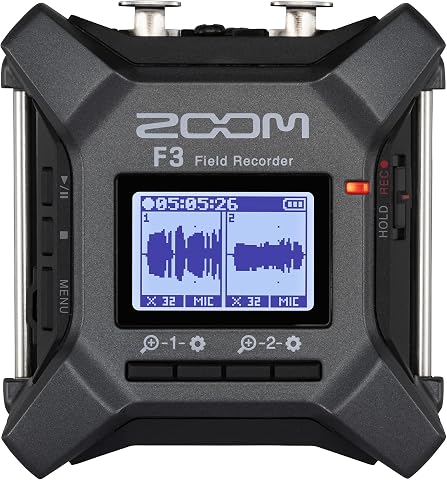
The Zoom F3 records two channels of audio in 32-bit float WAV format, helping capture quiet dialogue and sudden peaks without manual level adjustments. It has two locking XLR/TRS inputs, ultra-low-noise preamps, wireless control, and flexible battery-powered or USB workflows for field and location recording.
Pros:
- 32-bit float recording handles quiet audio and sudden peaks without stopping to adjust levels.
- Dual locking XLR/TRS inputs help keep connections secure in complex setups.
- Ultra-low-noise preamps support clean recording in unpredictable environments.
- Flexible battery-powered and USB workflows support field use.
Cons:
- Requires two AA batteries for battery-powered operation.
- The 2-inch screen may limit on-device visibility.
Best for: Podcasters who need a portable two-channel recorder
Not ideal for: Setups that require more than two simultaneous channels
Bottom line: Choose the Zoom F3 when its two-channel format, connections, and listed requirements fit your recording plans.
For a budget-first buying order, begin with the microphone and the connections needed to record, then add headphones for monitoring. Choose a mixer if your workflow calls for a dedicated production unit, and add a boom arm or acoustic panels based on your desk and room plan. Consider the portable recorder when separate field recording fits your needs. Buy for the next real recording you expect to make, and check listing details before filling gaps with accessories.
You do not need every item to begin building a practical podcast setup. Start with the gear that fits your recording space and workflow, then use experience from your first sessions to guide the next choice. Check fit, connections, and placement as a set, and this checklist can help you make a setup that feels manageable for your business.