Among these point of sale systems for small businesses, Square Register is my best overall pick for businesses that want an integrated counter setup, while Square Terminal stands out for mobile payments and Clover Station Duo for a fuller dual-screen station. The right choice depends on whether you need a complete checkout counter, a portable card terminal, or lower-cost hardware built around a tablet. Included printers, cash drawers, scanners, and screens can simplify setup, but they may limit your choice of software or future upgrades. I compare the 12 systems by their fit for different small business needs, with tradeoffs to help narrow the field. Read on for the full breakdown and a buying guide.

Get business pricing on office and shipping supplies
- Business-only prices and quantity discounts
- Tax-exempt purchasing
- Multiple users, one account, clear invoices
Key Takeaways
- Square Register is the clearest all-around counter pick in this lineup because it combines a customer-facing checkout setup with a dedicated POS design; buyers who need mobility should look at Square Terminal or Square Handheld instead.
- Square Terminal and Square Handheld suit different kinds of portable checkout: the former is a compact payment terminal, while the latter is designed for taking payments while moving around a business.
- Clover Station Duo and SmartPOS 129 offer dual-screen layouts, which can make customer-facing checkout easier, but their larger footprint is less suited to tight counters.
- Datio’s iPad and Fire tablet bundles package common counter hardware together, while the H10 and all-in-one touchscreen models emphasize built-in components; check software compatibility before choosing either route.
- SumUp POS Lite is the compact touchscreen option, while Windows-based Volcora and the printer-equipped touchscreen register may fit buyers with specific hardware preferences who are willing to check support and software details closely.
| Datio POS Base Station and Cash Register for iPad |  | Best for Flexible Payment Setups | Compatible software: Datio POS | Software subscription: Monthly; includes software, support, and online reports | Payment options: Worldpay processing with approval, another processor and terminal, or cash only | VIEW LATEST PRICE | See Our Full Breakdown |
| Clover Station Duo POS System |  | Best for Customer-Facing Checkout | Merchant display: 14-inch HD | Customer display: 8-inch touchscreen | Included hardware: Printer and cash drawer | VIEW LATEST PRICE | See Our Full Breakdown |
| Square Terminal Mobile Point-of-Sale and Credit Card Machine |  | Best Compact All-in-One | Payment methods: Major credit and debit cards | Chip card processing: About 2 seconds | Battery: Built-in; designed to last all day | VIEW LATEST PRICE | See Our Full Breakdown |
| Square Register (2nd Generation) Point of Sale System |  | Best for a Protected Fixed Counter | Generation: 2nd | Display: Dual responsive touchscreens | Software: Built-in POS software | VIEW LATEST PRICE | See Our Full Breakdown |
| H10 Android 14 POS Terminal, 58mm Printer, Barcode Scanner, NFC |  | Best for Mobile Retail Inventory | Operating system: Android 14 | Processor: Octa-Core 2.0 GHz | Memory and storage: 3 GB RAM; 32 GB ROM | VIEW LATEST PRICE | See Our Full Breakdown |
| SmartPOS 129 All-in-One POS System with Dual Touchscreens |  | Best for Ready-to-Equip Retail Counters | Cashier touchscreen: 15 inches | Customer-facing display: 15 inches | Included hardware: Cash drawer, handheld scanner, thermal printer | VIEW LATEST PRICE | See Our Full Breakdown |
| Volcora POS Terminal with Windows 11 Professional, 15.6-Inch Touchscreen |  | Best for Windows-Based POS Setups | Operating system: Windows 11 Professional | Processor: Intel Core i5 | Memory: 4 GB | VIEW LATEST PRICE | See Our Full Breakdown |
| Datio POS System for 10-Inch Amazon Fire Tablet with Receipt Printer, Cash Drawer, and Stand |  | Best for Datio App Users | Included components: Register base, thermal receipt printer, cash drawer, and stand | Tablet compatibility: 10-inch Amazon Fire Tablet | Tablet included: No | VIEW LATEST PRICE | See Our Full Breakdown |
| SumUp POS Lite Compact 13-Inch Touchscreen Point of Sale System |  | Best for Simple, Low-Commitment Checkout | Screen size: 13 inches | Stand material: Die-cast aluminium | Software: Pre-installed POS software with automated updates | VIEW LATEST PRICE | See Our Full Breakdown |
| Touchscreen POS Cash Register with Built-In Thermal Printer | 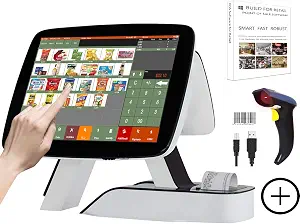 | Best for Built-In Receipt Printing | Main display: 15 inches, 1024 × 768 | Customer display: 11.6 inches | Receipt printer: Built-in 58 mm thermal printer | VIEW LATEST PRICE | See Our Full Breakdown |
| Square Handheld Portable POS Payment Terminal |  | Best for Mobile Selling | Functions: Payment acceptance, tableside ordering, barcode scanning | Payment methods: Major credit and debit cards | Connectivity: Offline payments supported | VIEW LATEST PRICE | See Our Full Breakdown |
| Datio POS System with Cash Drawer and Receipt Printer for 9.7–10.2-Inch iPads |  | Best iPad Counter Bundle | Color: White | Compatible iPad sizes: 9.7–10.2 inches | Included components: Register base, thermal receipt printer, locking cash drawer, power and connection cables | VIEW LATEST PRICE | See Our Full Breakdown |
More Details on Our Top Picks
Datio POS Base Station and Cash Register for iPad
The Datio POS Base Station suits a small shop, salon, or quick-service counter that wants a fixed register and can choose how to take payments. It can be configured for cash only, Worldpay processing after approval, or another processor and terminal. That flexibility sets it apart from the Clover Station Duo, which requires its specified processing account. Datio does require its own monthly software subscription, which bundles support and online reports, so ongoing software costs are part of the setup. The Amazon Fire device is not included, and Worldpay card acceptance depends on approval. I’d shortlist it for owners who value processor choice and support, but skip it if you need a complete out-of-box register or want to avoid a recurring software commitment.
Pros:- Designed for retail, salons, and quick-service businesses
- Can be configured for cash-only sales or card processing
- Allows an alternative processor and terminal
- Subscription includes support and online reports
Cons:- Requires a monthly Datio POS software subscription
- Amazon Fire device is not included
- Worldpay EMV device use depends on processing approval
Best for: Small retailers, salons, and quick-service operators who want a fixed register with cash-only or multiple card-processing setup options
Not ideal for: Owners seeking a complete setup without recurring software costs or buyers who need an included display device
- Compatible software:Datio POS
- Software subscription:Monthly; includes software, support, and online reports
- Payment options:Worldpay processing with approval, another processor and terminal, or cash only
- Amazon Fire device:Not included
- Suitable businesses:Retail, salons, and quick-service restaurants
- Support channels:Phone, text, and email
Our verdict“Choose the Datio base station if processor flexibility and included support matter more than having the display device bundled.”
Clover Station Duo POS System
The Clover Station Duo is built for a staffed counter where customers should be able to review an order, add a tip, redeem rewards, and pay on their own screen. Its 14-inch merchant display and 8-inch customer touchscreen make that interaction more direct than the single-device Square Terminal, which is better suited to moving around a shop. A printer and cash drawer are included, and compatible devices can extend the setup as a business grows. The tradeoff is a firm commitment to a Powering POS processing account; the system cannot be used with another processor. Its availability is also limited to the US, USVI, and Puerto Rico. I’d favor it for a busy countertop operation that wants a complete, expandable station and accepts those processor and location limits.
Pros:- Customer touchscreen supports order confirmation, tipping, rewards, and payment
- Includes a printer and cash drawer
- Compatible devices and accessories can expand the setup
- Built-in software is designed for straightforward setup and staff training
Cons:- Requires a Powering POS merchant processing account
- Cannot be used with a different processor
- Available only in the US, USVI, and Puerto Rico
Best for: US cafes, salons, and retailers with a staffed checkout counter that want customers to confirm and pay for orders at a second screen
Not ideal for: Businesses outside the US, USVI, or Puerto Rico, or owners who need to keep their current payment processor
- Merchant display:14-inch HD
- Customer display:8-inch touchscreen
- Included hardware:Printer and cash drawer
- Processor requirement:Powering POS merchant processing account
- Availability:US, USVI, and Puerto Rico
- Expansion:Compatible countertop and handheld devices and accessories
Our verdict“Pick the Clover Station Duo for a customer-facing counter setup if its required processor and regional availability fit your business.”
Square Terminal Mobile Point-of-Sale and Credit Card Machine
The Square Terminal combines card acceptance and receipt printing in one cordless device, making it a practical fit for small shops that need a counter option they can also carry around the floor. Its built-in battery is designed to last all day, and chip cards are processed in about two seconds. That mobility is the clear distinction from the fixed Square Register (2nd Generation), whose dual touchscreens make more sense for a dedicated checkout station. The Terminal accepts major credit and debit cards, with funds available as soon as the next business day. Its compact form also means it does not offer the Register’s described dual-screen workflow. Payment processing fees still apply, so I’d choose it for flexible checkout and printed receipts, rather than for a multi-screen counter experience.
Pros:- Combines payment processing and receipt printing in one device
- Built-in battery supports cordless checkout
- Accepts major credit and debit cards
- Chip cards process in about two seconds
Cons:- Payment processing fees apply
- Does not provide the dual-screen checkout workflow of the Square Register
- Battery runtime is described as all-day, with no specific duration provided
Best for: Small retailers and service businesses that need to take card payments at the counter or move checkout around the premises
Not ideal for: Businesses that need a fixed dual-screen checkout station or a more expansive countertop setup
- Payment methods:Major credit and debit cards
- Chip card processing:About 2 seconds
- Battery:Built-in; designed to last all day
- Receipt printer:Built in
- Fund availability:As soon as the next business day
- Use:At a counter or around a store
Our verdict“Choose Square Terminal if you want one portable device for card payments and printed receipts.”
Square Register (2nd Generation) Point of Sale System
The Square Register (2nd Generation) is the fixed-counter choice for a small business that wants staff and customers to interact with separate touchscreens. Its built-in POS software and support for major cards keep the described setup focused on everyday checkout, while the IP54-rated design adds resistance to dust and everyday spills. That protection gives it a practical edge over the portable Square Terminal for a permanent station in a busy shop, though the Terminal is easier to carry between customers or locations. The available product details do not specify connectivity or payment processing fees, leaving important setup questions open for a buyer to confirm. I’d pick the Register for a dedicated checkout area where dual screens and spill resistance matter more than mobility.
Pros:- Dual responsive touchscreens support a two-screen checkout workflow
- Built-in POS software
- IP54 rating offers resistance to everyday spills and dust
- Supports major card payments
Cons:- Designed as a countertop system rather than a mobile terminal
- Specific connectivity details are not provided
- Payment processing fees are not specified
Best for: Small retailers with a permanent checkout counter where staff and customers need separate touchscreens and the hardware may face everyday spills
Not ideal for: Mobile sellers or businesses that need specified connectivity and processing-fee details before selecting a system
- Generation:2nd
- Display:Dual responsive touchscreens
- Software:Built-in POS software
- Payment acceptance:Major cards
- Form factor:Countertop POS system
Our verdict“Choose the Square Register for a fixed small-business checkout where dual screens and everyday spill resistance are priorities.”
H10 Android 14 POS Terminal, 58mm Printer, Barcode Scanner, NFC
The H10 Android 14 POS Terminal is aimed at retailers who need scanning and receipt printing in a handheld unit. Its dedicated 1D/2D barcode scanner, NFC, and built-in thermal printer can reduce the need to carry separate checkout tools; 4G LTE and Wi-Fi also give it more connection options than the countertop Clover Station Duo. At 345 g, it is described as suitable for one-handed use in retail or field settings. The tradeoff is that its 3,000 mAh battery may limit runtime during intensive use, and the provided details do not identify compatible POS software or payment processors. Compared with the Square Terminal, the H10 adds a dedicated scanner and Android platform, but buyers should confirm software and payment compatibility before relying on it as their main register.
Pros:- Dedicated hardware scanner reads 1D and 2D barcodes
- Built-in 58 mm thermal printer needs no ink or toner
- NFC and multiple wireless connection options
- 345 g design is intended for one-handed use
Cons:- The 3,000 mAh battery may limit runtime during intensive use
- Compatible POS software is not specified
- Payment processor compatibility is not specified
Best for: Small retailers and field sellers who need handheld barcode scanning, contactless payment support, and printed receipts
Not ideal for: Businesses that need clearly specified POS software or processor compatibility, or staff who need a terminal for intensive all-day use without recharging
- Operating system:Android 14
- Processor:Octa-Core 2.0 GHz
- Memory and storage:3 GB RAM; 32 GB ROM
- Printer:58 mm thermal; 80 mm/s print speed
- Barcode scanner:Hardware 1D/2D
- NFC:Enabled
- Connectivity:4G LTE, dual-band Wi-Fi, Bluetooth 5.3
- Battery and weight:3000 mAh lithium polymer; 345 g
- Warranty:1 year
Our verdict“Choose the H10 for handheld retail work when its scanner and connectivity suit your workflow and software compatibility is confirmed.”
SmartPOS 129 All-in-One POS System with Dual Touchscreens
The SmartPOS 129 is a strong fit for a small shop that wants the main checkout hardware in one package: a cashier touchscreen, customer-facing display, cash drawer, scanner, and thermal printer. Its two 15-inch screens give customers a clear view of the transaction, while support for over 50 card processor integrations gives owners room to choose a payment provider. That flexibility separates it from the SumUp POS Lite, which bundles software and processing but charges per card-reader payment. The tradeoff is setup: SmartPOS does not name a processor, so the owner must select and configure a compatible service. A setup call and Retail360 mobile app offer some help, but this is a better match for buyers willing to make that choice than for someone seeking a single, ready-to-run payment setup.
Pros:- Includes the core counter hardware: cash drawer, scanner, and thermal printer
- Dual 15-inch screens serve both cashier and customer
- Integrates with over 50 card processors
- Includes a setup call and Retail360 mobile app
Cons:- Does not specify a card processor
- Requires the owner to choose and set up a compatible processor
Best for: Small retail shops that want a full counter hardware package and the freedom to select a compatible card processor
Not ideal for: First-time owners seeking a named, ready-to-use payment processor with minimal setup
- Cashier touchscreen:15 inches
- Customer-facing display:15 inches
- Included hardware:Cash drawer, handheld scanner, thermal printer
- Card processor integrations:Over 50
- Mobile app:Retail360
- Setup support:Free setup call
Our verdict“Choose the SmartPOS 129 if you want a complete two-screen checkout station and are comfortable selecting your own payment processor.”
Volcora POS Terminal with Windows 11 Professional, 15.6-Inch Touchscreen
Volcora is a hardware-first Windows terminal for a small business that already knows which POS software it plans to run. Its 15.6-inch touchscreen, Intel Core i5 processor, and varied ports give it room to connect peripherals such as scanners and printers. That makes it more adaptable as a workstation than the SumUp POS Lite, which arrives with POS software and payment processing already in place. The tradeoff is that Volcora does not specify any POS software, and its 4 GB of memory may constrain demanding applications or multitasking. Its metal base and limited lifetime warranty add practical reassurance, while the SumUp is the simpler path for an owner who wants fewer setup decisions. Choose Volcora when software compatibility and Windows are priorities; skip it if you expect a complete register out of the box.
Pros:- 15.6-inch capacitive touchscreen
- Intel Core i5 processor
- Multiple ports, including USB, serial, HDMI, and Ethernet
- Metal base, limited lifetime warranty, and US-based customer support
Cons:- POS software is not specified or included in the product details
- 4 GB of memory may limit demanding software or multitasking
Best for: Small retailers with a chosen Windows-compatible POS application and peripherals to connect
Not ideal for: Owners who want bundled POS software, payment processing, and a ready-to-use checkout setup
- Operating system:Windows 11 Professional
- Processor:Intel Core i5
- Memory:4 GB
- Storage:128 GB hard drive
- Screen:15.6-inch capacitive LCD touchscreen
- Display resolution:1366 × 768
- Ports:2 serial, 4 USB, HDMI, audio input, DC 12V power input, Ethernet
- Warranty:Limited lifetime warranty
Our verdict“Pick Volcora if your small business needs a Windows POS terminal to pair with software you select separately.”
Datio POS System for 10-Inch Amazon Fire Tablet with Receipt Printer, Cash Drawer, and Stand
This Datio bundle makes the most sense for a small shop or quick-serve counter that has chosen the Datio POS app and wants matching register hardware, receipt printer, cash drawer, and stand. Unlike the Volcora terminal, it is tied to a specified POS app and a compatible 10-inch Amazon Fire Tablet, though the tablet itself is not included. That means the owner needs to source the right device before checkout is ready. The $64 monthly software subscription includes updates, support, and warranty and can be canceled without a long-term contract, but it adds a recurring commitment that the SumUp POS Lite does not have. Payment options are also specific: Datio payments via Worldpay or an owner-supplied terminal for cash-only tracking. Buyers who want more payment freedom should compare the SmartPOS 129’s processor integrations.
Pros:- Includes a register base, thermal receipt printer, cash drawer, and stand
- Designed to work with the Datio POS app
- Subscription includes software updates, support, and warranty
- Subscription can be canceled without a long-term contract
Cons:- Compatible 10-inch Amazon Fire Tablet must be purchased separately
- Requires a $64 monthly software subscription
- Payment choices are limited to Datio payments via Worldpay or cash-only tracking with an own terminal
Best for: Small retailers and quick-serve restaurants already committed to the Datio POS app and a compatible Fire tablet
Not ideal for: Owners who want the tablet included, avoid recurring software fees, or need broad payment processor choice
- Included components:Register base, thermal receipt printer, cash drawer, and stand
- Tablet compatibility:10-inch Amazon Fire Tablet
- Tablet included:No
- Software:Datio POS App
- Subscription:$64/month; cancel anytime
- Payment processing:Datio payments via Worldpay or own terminal for cash-only tracking
Our verdict“Choose this Datio set if you want its app and hardware together and already have, or plan to buy, a compatible Fire tablet.”
SumUp POS Lite Compact 13-Inch Touchscreen Point of Sale System
SumUp POS Lite is the straightforward choice for a small business that wants pre-installed POS software and payment processing without a fixed monthly fee or binding contract. Its 13-inch touchscreen and die-cast aluminium stand give it a compact counter footprint, while automated software updates reduce the need for owners to manage routine maintenance. Compared with the SmartPOS 129, SumUp asks less of the buyer during setup because its software and processing are already part of the offering; the SmartPOS instead includes more counter hardware and lets owners choose from many processors. SumUp’s tradeoff is a 2.6% + 10 per card-reader payment fee, so businesses should account for transaction charges as sales grow. The product details do not list a cash drawer, printer, or scanner, which may mean buying more equipment for a full retail counter.
Pros:- Pre-installed POS software
- Automated software updates
- No fixed monthly fee
- No binding contract
Cons:- Charges 2.6% + 10 per card-reader payment
- Product details do not list a cash drawer, receipt printer, or barcode scanner
- Processor choice is not described as broadly as the SmartPOS 129’s integrations
Best for: Solo operators and small businesses that want a compact touchscreen register with software and processing already set up
Not ideal for: Retailers who need a complete hardware bundle or prefer choosing their own payment processor
- Screen size:13 inches
- Stand material:Die-cast aluminium
- Software:Pre-installed POS software with automated updates
- Payment processing fee:2.6% + 10 per card-reader payment
- Fixed monthly fee:None
- Contract:No binding contract
Our verdict“Choose SumUp POS Lite for a compact, low-commitment checkout setup if per-payment processing fees suit your business.”
Touchscreen POS Cash Register with Built-In Thermal Printer
This register suits a small retailer or restaurant looking for a single counter unit with built-in receipt printing, a customer display, and a barcode scanner. Its Intel Core i5 processor, 8 GB RAM, and 128 GB SSD give it a more fully specified computing base than the Volcora terminal, which has 4 GB RAM and leaves POS software unspecified. The included MSJ POS software covers billing, checkout, discounts, invoicing, customer and order management, promotions, and reports, so it offers more defined sales tools than the hardware-only Volcora. The tradeoff is less clarity around compatibility and warranty: neither is detailed in the product information. Its 11.6-inch customer display is also smaller than the SmartPOS 129’s 15-inch customer screen. This is a practical fit for buyers who value integrated checkout equipment over a larger customer display.
Pros:- Built-in 58 mm thermal receipt printer
- Includes barcode scanner, keyboard and mouse set, and thermal paper
- MSJ POS software supports sales, customer, order, promotion, and report management
- Intel Core i5 processor, 8 GB RAM, and 128 GB SSD
Cons:- Customer display is smaller than the main screen
- Warranty terms are not specified
- Detailed software compatibility is not provided
Best for: Small retailers or restaurants that want included sales software, barcode scanning, and built-in receipt printing at one counter
Not ideal for: Businesses that need a larger customer-facing screen or clear warranty and software compatibility details before choosing
- Main display:15 inches, 1024 × 768
- Customer display:11.6 inches
- Receipt printer:Built-in 58 mm thermal printer
- Processor:Intel Core i5
- Memory:8 GB RAM
- Storage:128 GB SSD
- Included accessories:Barcode scanner, keyboard and mouse set, 10 rolls of thermal paper
- Software:MSJ POS software with lifetime use
- Intended use:Retail or restaurant
Our verdict“Choose this register if integrated printing and included business software matter more than a large customer display or fully documented compatibility.”
Square Handheld Portable POS Payment Terminal
The Square Handheld Portable POS Payment Terminal suits small businesses that take payments away from a fixed counter, such as cafés offering tableside service or market sellers moving between customers. Its built-in barcode scanner can make item lookup easier, while offline payment support helps keep checkout available when connectivity drops. Compared with the Square Terminal Mobile Point-of-Sale and Credit Card Machine, this model is described as pocketable and adds barcode scanning, making it a stronger fit for sellers who need to identify products as well as accept payments on the move. The tradeoff is that it is a handheld device rather than a full counter setup, so businesses needing a receipt printer or cash drawer will need other equipment. Its optional protective case also leaves drop protection as an added purchase.
Pros:- Slim, lightweight design is easy to carry between customers
- Built-in barcode scanner supports quicker product lookup
- Offline payment support can help during connectivity interruptions
- Long-lasting battery supports mobile selling
Cons:- Does not include a receipt printer or cash drawer
- Protective case for accidental drops is optional
Best for: Market vendors, mobile service businesses, and small cafés that need to take card payments and scan items away from a fixed checkout
Not ideal for: Retailers who need a complete staffed counter with a receipt printer and cash drawer, or workers who need included drop protection
- Functions:Payment acceptance, tableside ordering, barcode scanning
- Payment methods:Major credit and debit cards
- Connectivity:Offline payments supported
- Design:Slim, lightweight, pocketable
- Durability:Resistant to water splashes and dust
- Battery:Long-lasting
- Protective case:Optional
Our verdict“Choose this handheld Square device if portability, barcode scanning, and offline payments matter more than having a complete counter setup.”
Datio POS System with Cash Drawer and Receipt Printer for 9.7–10.2-Inch iPads
This Datio POS System is a counter-focused bundle for a small shop or restaurant that already plans to use a compatible iPad. The package combines a tabletop stand, thermal receipt printer, and locking cash drawer, covering several basic checkout needs in one hardware purchase. Compared with the Datio POS Base Station and Cash Register for iPad, this bundle is specifically described as including the printer, drawer, and connection cables, which makes its included counter equipment clear. The tradeoff is that the iPad is not included, and the system requires a Datio POS app subscription; the hardware alone is not a ready-to-run register. Its fixed tabletop design also makes less sense for businesses that need a portable terminal or want to avoid relying on a separate tablet.
Pros:- Bundles an iPad stand, thermal receipt printer, and locking cash drawer
- Thermal printing does not require ink or toner
- Designed for retail and restaurant checkout counters
- Includes power and connection cables
Cons:- Compatible 9.7–10.2-inch iPad must be supplied separately
- Requires a Datio POS app subscription
- Tabletop form factor is not suited to mobile checkout
Best for: Independent retailers and small restaurants that already own a compatible iPad and want a fixed checkout with a printer and locking cash drawer
Not ideal for: New businesses seeking a complete checkout without separate tablet and software costs, or sellers who need mobile payment hardware
- Color:White
- Compatible iPad sizes:9.7–10.2 inches
- Included components:Register base, thermal receipt printer, locking cash drawer, power and connection cables
- Mounting type:Tabletop
- Form factor:Desk stand
- Software requirement:Datio POS app subscription
- Tablet included:No
Our verdict“Pick this Datio bundle if you already have a compatible iPad and want the core hardware for a stationary retail or restaurant register.”

How We Picked
I ranked these systems by how clearly their hardware fits common small business checkout needs: fixed counter service, mobile payment, compact setups, and bundles that include peripherals. I gave more weight to a coherent, practical setup than to a long list of included components, since printers, drawers, scanners, and extra screens only help when they work with the POS software a business plans to use. I also weighed portability, counter footprint, and whether the design appears approachable for a small team.
The order reflects how broadly each product may serve a small business, then how well the remaining options serve narrower needs. That puts an integrated counter system ahead of a specialized handheld for general use, while dedicated portable devices rank well for businesses that take payments away from the register. Tablet bundles and less familiar all-in-one terminals can be useful, but their position depends more heavily on checking compatibility, software support, and included hardware before purchase.
Factors to Consider When Choosing Point Of Sale Systems For Small Business
Choosing a POS setup starts with the way customers pay and staff work, not with the number of devices in the box. These questions can help you avoid buying a system that fits your counter but not your daily operations.
Match the setup to where checkout happens
Map the places where staff take orders and payments during a normal shift: a fixed counter, tables, a queue, a market stall, or a service van. A stationary register can make a busy counter feel organized, while a handheld or portable terminal can reduce trips back to a fixed checkout point. Some businesses need both, but buying duplicate hardware before the workflow is clear can add setup and support work. Consider whether staff need to carry the whole device or just take a payment away from the counter. Also check how the chosen setup handles a lost connection, since a portable device is only useful where it can reliably connect and process payments. Choose for your most common checkout pattern, then add a second device only when it solves a specific bottleneck.
Check software and payment compatibility first
A POS terminal is part of a larger system that may include sales software, payment processing, inventory, employee accounts, and reporting. Before buying hardware, confirm which POS app it runs, which payment methods it accepts, and whether your existing processor or business tools can connect. Bundles built around iPads or Fire tablets can look straightforward, but the stand and peripherals do not guarantee that every app will support the setup. The same check matters for Android and Windows terminals, where operating system support can shape which apps and updates are available. Ask the seller or software provider for a current compatibility list, not just a general claim that a device is compatible. A short check now can prevent a usable-looking terminal from becoming a separate, disconnected checkout station.
Treat bundled accessories as a workflow choice
A receipt printer, cash drawer, barcode scanner, and customer display each add a different step to checkout. Decide which ones your business actually uses: a cash-free service may not need a drawer, while a shop that labels and scans stock may gain more from a scanner than from a second screen. Bundled hardware can reduce the effort of sourcing separate parts, but it can also leave you with components that do not suit your counter or software. Confirm connection types, paper size, scanner support, and whether the cash drawer opens through the POS app. Leave room for cables, paper rolls, and routine cleaning when planning the counter layout. Buying only the peripherals that support your real workflow keeps the setup easier to maintain.
Plan for the full cost of running the system
The purchase price is only one part of the cost of a POS setup. Payment processing, software plans, extra user accounts, accessories, connectivity, and replacement parts can shape the ongoing expense. Compare the terms that apply to your transaction volume and business model, since a system that is easy to start with may have different costs as sales grow. Check whether software features such as inventory tools or sales reports require a separate plan. Ask what support is included and how hardware repairs or replacements are handled. A clear estimate of recurring costs makes a bundled terminal easier to compare with a tablet-based setup that needs separate components.
Choose for the counter you have and the one you may need
Measure counter depth and width before choosing a large station, especially if the customer-facing screen, printer, and cash drawer all sit together. A dual-screen setup may improve the checkout conversation, but a compact terminal can leave more room for merchandise, food preparation, or paperwork. Think about glare, viewing angle, cable routing, and whether customers can comfortably see the payment prompt. If you may add a second checkout point later, find out whether the software can share inventory and reports across devices. Avoid choosing an unusually specific hardware bundle unless replacement parts and software support are easy to find. A little room to adapt matters when a small business changes its layout or adds staff.
Make support and upkeep part of the buying decision
A POS system needs attention after installation: software updates, receipt paper, cleaning, troubleshooting, and staff onboarding all take time. Ask how updates are delivered, whether the system needs a particular tablet or operating system version, and what happens if a printer or screen fails. Less familiar hardware can meet a specific need, but it may take more effort to confirm repair options and ongoing software support. For a small team, straightforward setup and accessible help can matter as much as a built-in scanner. Keep a simple backup plan for taking payments or recording sales if the main device is unavailable. Pick the system your staff can keep running during a busy day, not just the one with the most components.
Frequently Asked Questions
Should I choose an all-in-one POS terminal or a tablet bundle?
An all-in-one terminal can reduce the number of separate devices and may simplify a fixed checkout counter. A tablet bundle can be easier to adapt if you already use a compatible tablet or want to replace one component at a time. The tradeoff is that tablet bundles depend on the app, operating system, and accessories working together. Check whether the printer, scanner, and drawer are supported by your POS software before deciding. Choose based on the workflow and support you need, rather than the number of parts included.
Can I use a portable POS as my only checkout system?
That can work for businesses with occasional transactions, mobile service, or a small checkout area. Before relying on a portable device alone, confirm that it supports the sales, receipt, and reporting tasks you need throughout a shift. A payment terminal may handle card transactions well but offer less of the counter workflow available in a full register setup. Also check battery life, connectivity, and how staff will access inventory or order details. If checkout is frequent or involves cash and scanning, a dedicated counter system may be more practical.
What should I verify before buying a POS system with a cash drawer and printer?
Confirm that the drawer and printer connect to the POS software and device you intend to use. Check the printer’s paper format, the drawer trigger or connection type, and whether setup instructions are available. Ask whether the accessories are included in the exact configuration being sold, since product listings can cover several bundles. Consider where the drawer will fit and how staff will replace paper during service. These details help prevent a bundle from arriving with hardware that cannot be used in your checkout flow.
Is a second customer-facing screen worth having for a small business?
A customer-facing screen can let buyers review items, follow the payment prompt, and interact with checkout without turning the main display around. That can help at a fixed counter with steady in-person transactions. It takes up additional space, though, and may be unnecessary for businesses that mostly take payments on the move or handle short service transactions. Think about whether customers need to confirm order details or enter information at checkout. If the answer is rarely, a simpler terminal may fit better.
How can I avoid outgrowing a POS system as my business changes?
Start by listing the capabilities you may need next, such as more checkout stations, additional staff accounts, inventory tracking, or a different payment workflow. Ask whether the POS software can share product and sales data across devices before you add hardware. Check upgrade paths and replacement availability for the terminal and its accessories. A compact setup may be right today, but limited app support or hard-to-source components can complicate a later change. Favor a system with clear support and a practical way to add functions as your operations grow.
Conclusion
For most small businesses seeking a fixed checkout, I recommend Square Register as the best overall fit in this lineup. Square Terminal is my pick for mobile payments, while Square Handheld suits staff who need to take checkout around the business. Datio’s tablet bundles are worth a look for buyers who want common counter accessories together, provided the chosen POS app supports them. For a fuller two-screen station, compare Clover Station Duo and SmartPOS 129; for a compact touchscreen, consider SumUp POS Lite. Beginners should favor the system whose software, setup instructions, and support match their needs, while buyers seeking a premium counter should prioritize an integrated layout and reliable support over extra hardware alone.
Evergreen bestsellers Picks
bestsellers
As an affiliate, we earn on qualifying purchases.