Shopping for point of sale systems for small business comes down to one core decision: how much of your checkout you want bundled into hardware versus how much you want running through software and subscriptions. Clover Station Duo earns the best overall spot because its dual-screen design, integrated payments, and polished software cover nearly every front-counter scenario a growing business faces. Square Register (2nd Generation) is the strongest software ecosystem for owners who want deep inventory and reporting tools, while Datio’s tablet-based kits win on value for anyone who already owns an iPad or Fire tablet. The main tradeoffs in this category are upfront cost versus ongoing fees, portability versus full counter setups, and closed payment ecosystems versus open hardware you can pair with your own software. Keep reading for the full breakdown of all twelve systems.

Get business pricing on office and shipping supplies
- Business-only prices and quantity discounts
- Tax-exempt purchasing
- Multiple users, one account, clear invoices
Key Takeaways
- All-in-one terminals like the Clover Station Duo and SmartPOS 129 cost more upfront but eliminate the piecemeal buying of printers, drawers, and scanners that tablet kits require.
- Square‘s hardware (Register, Terminal, Handheld) locks you into Square‘s payment processing and pricing, which trades flexibility for the easiest setup and best free software tier in the lineup.
- The three Datio kits are the clear value plays, but they assume you already own a compatible tablet — buyers starting from scratch should compare their total cost against the H10 and Volcora bundles.
- Portability varies sharply: the Square Terminal and Square Handheld are built for counter-hop and mobile use, while the Volcora and Clover Station Duo are stationary countertop machines.
- Operating system matters more than buyers expect — Windows terminals like the Volcora run traditional retail software, Android units like the H10 rely on app ecosystems, and Square and Clover tie everything to their own platforms.
| Volcora POS Terminal with Windows 11 Professional, 15.6-Inch Touchscreen |  | Best for Software Freedom | Operating system: Windows 11 Professional | Processor: Intel Core i5 | Memory: 4 GB | VIEW LATEST PRICE | See Our Full Breakdown |
| SmartPOS 129 All-in-One POS System with Dual Touchscreens |  | Best Complete Starter Kit | Cashier touchscreen: 15 inches | Customer-facing display: 15 inches | Included hardware: Cash drawer, handheld scanner, thermal printer | VIEW LATEST PRICE | See Our Full Breakdown |
| SumUp POS Lite Compact 13-Inch Touchscreen Point of Sale System |  | Best for No-Contract Simplicity | Screen size: 13 inches | Stand material: Die-cast aluminium | Software: Pre-installed POS software with automated updates | VIEW LATEST PRICE | See Our Full Breakdown |
| H10 Android 14 POS Terminal, 58mm Printer, Barcode Scanner, NFC |  | Best Mobile Pick | Operating system: Android 14 | Processor: Octa-core 2.0 GHz | Memory / Storage: 3 GB RAM / 32 GB ROM | VIEW LATEST PRICE | See Our Full Breakdown |
| Square Register (2nd Generation) Point of Sale System |  | Best Ecosystem Pick | Generation: 2nd | Display: Dual responsive touchscreens | Software: Built-in POS software | VIEW LATEST PRICE | See Our Full Breakdown |
| Square Handheld Portable POS Payment Terminal |  | Best for Mobile and Tableside Service | Functions: Payment acceptance, tableside ordering, barcode scanning | Payment methods: Major credit and debit cards | Connectivity: Offline payments supported | VIEW LATEST PRICE | See Our Full Breakdown |
| Datio POS System for 10-Inch Amazon Fire Tablet with Receipt Printer, Cash Drawer, and Stand |  | Best Budget Hardware Bundle for Fire Tablet Owners | Included components: Register base, thermal receipt printer, cash drawer, and stand | Compatibility: 10-inch Amazon Fire Tablet | Software: Datio POS App | VIEW LATEST PRICE | See Our Full Breakdown |
| Touchscreen POS Cash Register with Built-In Thermal Printer | 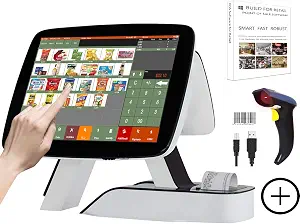 | Best All-in-One Value with No Subscription | Main display: 15 inches, 1024 × 768 | Customer display: 11.6 inches | Receipt printer: Built-in 58 mm thermal printer | VIEW LATEST PRICE | See Our Full Breakdown |
| Datio POS System with Cash Drawer and Receipt Printer for 9.7–10.2-Inch iPads |  | Best iPad-Based Counter Bundle | Color: White | Compatible iPad sizes: 9.7–10.2 inches | Included components: Register base, thermal receipt printer, locking cash drawer, power and connection cables | VIEW LATEST PRICE | See Our Full Breakdown |
| Square Terminal Mobile Point-of-Sale and Credit Card Machine |  | Best Single-Device Countertop Companion | Payment methods: Major credit and debit cards | Card processing: Chip cards processed in about 2 seconds | Battery: Built-in; designed to last all day | VIEW LATEST PRICE | See Our Full Breakdown |
| Datio POS Base Station and Cash Register for iPad |  | Best Subscription-Supported Setup | Compatible software: Datio POS (required) | Software subscription: Monthly; includes software, support, and online reports | Support channels: Phone, text, and email | VIEW LATEST PRICE | See Our Full Breakdown |
| Clover Station Duo POS System |  | Best Premium Dual-Screen Counter System | Merchant display: 14-inch HD | Customer display: 8-inch touchscreen | Customer screen functions: Order confirmation, tipping, rewards redemption, payment | VIEW LATEST PRICE | See Our Full Breakdown |
More Details on Our Top Picks
Volcora POS Terminal with Windows 11 Professional, 15.6-Inch Touchscreen
Most bundled POS systems lock you into their software ecosystem, but the Volcora POS Terminal flips that arrangement: you get capable Windows 11 Pro hardware and choose the POS software yourself. That makes it a strong pick for owners who already run QuickBooks POS, Aldelo, or industry-specific retail software. Compared with the SmartPOS 129, which arrives as a complete kit, Volcora is terminal-only — no printer, drawer, or scanner in the box.
The tradeoffs are real. 4 GB of RAM and a 128 GB hard drive will feel tight if your POS software is demanding or you keep years of transaction history locally. But for a buyer who wants full software control, a big 15.6-inch capacitive touchscreen, and a limited lifetime warranty, the flexibility outweighs the bare-bones configuration.
Pros:- Runs Windows 11 Pro so you can install virtually any POS software
- Large 15.6-inch capacitive touchscreen is easy to read during long shifts
- Extensive port selection (4 USB, 2 serial, HDMI, Ethernet) connects drawers, scanners, and printers
- Limited lifetime warranty with US-based customer support
Cons:- Only 4 GB of RAM and 128 GB of storage limits demanding POS software and local data retention
- Hardware only — no POS software, receipt printer, or payment hardware included
Best for: Small business owners who already own or plan to license their own POS software and want flexible Windows hardware to run it on
Not ideal for: First-time POS buyers who want a ready-to-run checkout kit — this ships without software, printer, or cash drawer
- Operating system:Windows 11 Professional
- Processor:Intel Core i5
- Memory:4 GB
- Storage:128 GB hard drive
- Screen:15.6-inch capacitive LCD touchscreen, 1366 × 768
- Ports:2 serial, 4 USB, HDMI, audio input, Ethernet, DC 12V
- Warranty:Limited lifetime warranty
Our verdict“Buy this if you want to keep control over your POS software choice and skip it if you need a plug-and-play checkout bundle.”
SmartPOS 129 All-in-One POS System with Dual Touchscreens
If you’re opening a register lane from scratch, the SmartPOS 129 is the most complete package in this lineup: cashier touchscreen, 15-inch customer-facing display, cash drawer, handheld scanner, and thermal printer all arrive together. That’s a sharp contrast to the Volcora terminal, where you’d source each of those peripherals separately and hope they play nicely together.
The standout flexibility is integration with over 50 card processors — no forced subscription and no proprietary lock-in, which separates it from closed ecosystems like the Square Register. The flip side: no processor is pre-selected, so you’ll spend time comparing rates and completing a separate merchant setup before your first sale. The included setup call and Retail360 mobile app soften that onboarding burden, but budget an afternoon for configuration.
Pros:- Complete hardware bundle: dual screens, cash drawer, scanner, and thermal printer
- Works with over 50 card processors so you can shop for the best rates
- No forced subscriptions or hidden monthly fees
- Includes a free setup call and the Retail360 mobile app
Cons:- No payment processor included — you must choose and configure one yourself
- More setup effort than software-included systems like the Square Register
Best for: New retail shops or cafés building their first full checkout lane who want every peripheral in one purchase and the freedom to pick their payment processor
Not ideal for: Owners who want to start taking cards the same day it arrives — processor selection and setup add lead time
- Cashier touchscreen:15 inches
- Customer-facing display:15 inches
- Included hardware:Cash drawer, handheld scanner, thermal printer
- Card processor integrations:Over 50
- Mobile app:Retail360
- Setup support:Free setup call included
Our verdict“This is the pick for a business that wants a full checkout station in one box and is willing to handle processor selection itself.”
SumUp POS Lite Compact 13-Inch Touchscreen Point of Sale System
The SumUp POS Lite wins on friction: software comes pre-installed, updates happen automatically, and there are no fixed monthly fees or binding contract. Compared with the Square Register, which also builds in its software, SumUp’s contract-free posture makes it easier to walk away if your business changes — a real advantage for seasonal shops or pop-ups testing a permanent location.
The hardware is lighter-duty than countertop rigs like the SmartPOS 129. The 13-inch tablet on a die-cast aluminium stand is compact and clean, but there’s no cash drawer, scanner, or printer bundled, so cash-heavy retailers will need add-ons. And the pay-as-you-go model means a 2.6% + 10¢ fee per card reader payment — fine at low volume, worth recalculating once card sales climb.
Pros:- No fixed monthly fees or binding contract
- Pre-installed POS software with automated updates means zero setup
- Compact 13-inch footprint with a sturdy die-cast aluminium stand
- Ideal for businesses that want to avoid vendor lock-in
Cons:- 2.6% + 10¢ fee applies to every card reader payment
- No cash drawer, receipt printer, or scanner included
Best for: Solo operators, salons, and seasonal businesses that want software ready out of the box with no monthly fees or long-term commitment
Not ideal for: High-volume stores — per-transaction fees and the lack of bundled peripherals add up at scale
- Screen size:13 inches
- Stand material:Die-cast aluminium
- Software:Pre-installed POS software with automated updates
- Payment processing fee:2.6% + 10¢ per card reader payment
- Contract:No binding contract, no fixed monthly fees
Our verdict“Choose this if you value month-to-month freedom and instant usability over a full hardware kit.”
H10 Android 14 POS Terminal, 58mm Printer, Barcode Scanner, NFC
Everything else in this roundup lives on a countertop. The H10 is the outlier: a 345-gram handheld running Android 14 with a built-in 58 mm thermal printer, hardware 1D/2D barcode scanner, and NFC tap-to-pay. If you sell at markets, deliver orders, or take payment tableside, no fixed terminal — not even the compact SumUp POS Lite — matches this mobility. The 4G LTE connection means you can process transactions anywhere with cell coverage, not just within Wi-Fi range.
The compromises follow from the form factor. A 3000 mAh battery will need mid-shift charging during heavy printing and scanning, and a 3-inch-wide screen is cramped for catalog browsing compared with a 15-inch countertop display. Think of it as a field tool, not a replacement for a primary register.
Pros:- True all-in-one mobility: printer, scanner, and NFC in one 345 g handheld
- 4G LTE plus dual-band Wi-Fi and Bluetooth 5.3 keep you connected anywhere
- Octa-core 2.0 GHz processor with Android 14 handles apps smoothly
- Hardware barcode scanner delivers faster, more accurate scans than camera-based apps
Cons:- 3000 mAh battery may need recharging during intensive full-day use
- Small handheld screen limits catalog management versus countertop systems
Best for: Market vendors, food trucks, and delivery or field-service businesses that need to scan, print, and take payment on the move
Not ideal for: Shops running a fixed checkout lane all day — the small screen and limited battery favor mobile use, not high-volume countertop work
- Operating system:Android 14
- Processor:Octa-core 2.0 GHz
- Memory / Storage:3 GB RAM / 32 GB ROM
- Printer:58 mm thermal, 80 mm/s print speed
- Scanner:Dedicated 1D/2D barcode scanner
- Connectivity:4G LTE, dual-band Wi-Fi, Bluetooth 5.3, NFC
- Battery:3000 mAh lithium polymer
- Weight:345 g
Our verdict“This is the clear choice for selling away from a counter, and the wrong choice for a stationary register replacement.”
Square Register (2nd Generation) Point of Sale System
The Square Register (2nd Generation) is the easiest path from box to first sale in this lineup. The POS software is built in, dual touchscreens handle the cashier-and-customer flow, and major cards work out of the gate — no processor shopping like the SmartPOS 129 requires. That convenience is the entire value proposition: you trade choice for speed.
Where the tradeoffs bite is transparency and flexibility. Processing fees aren’t specified upfront, and connectivity details are thin, so you’re accepting Square’s rates and ecosystem terms as part of the deal. The IP54 rating against spills and dust is a genuine durability edge over standard terminals like the Volcora, which matters in cafés and bars. Compared with the contract-free SumUp POS Lite, Square offers richer built-in tooling but a more closed arrangement.
Pros:- Built-in POS software means no installation or licensing to manage
- Dual touchscreens streamline cashier and customer checkout workflows
- IP54-rated design resists everyday spills, dust, and wear
- Accepts major cards right away without processor shopping
Cons:- Payment processing fees are not specified upfront
- Closed ecosystem limits third-party software and processor choice
Best for: Cafés, bars, and small retailers that want software, payments, and hardware from one vendor with same-day setup
Not ideal for: Owners who want to negotiate payment processing rates or run third-party POS software — Square’s closed ecosystem doesn’t allow it
- Generation:2nd
- Display:Dual responsive touchscreens
- Software:Built-in POS software
- Payment acceptance:Major cards
- Durability:IP54-rated splash and dust resistance
Our verdict“Pick this for the fastest route to a polished countertop checkout, and pass if processor flexibility matters more than convenience.”
Square Handheld Portable POS Payment Terminal
Square Handheld is the pick for businesses that sell away from a counter — food trucks, pop-ups, and full-service restaurants running tableside ordering. Compared with the Square Terminal, this device trades a built-in receipt printer for a slimmer, pocketable form factor and a built-in barcode scanner, which makes it better suited to floor staff who need to ring items and take orders on the move. Offline payment support means a spotty Wi-Fi connection won’t stop a sale. The main tradeoff: it’s a handheld, not a countertop register, so a shop with a fixed checkout lane will still want something like the SmartPOS 129 or Square Register as its primary station.
Pros:- Pocketable, lightweight design with a comfortable grip
- Built-in barcode scanner for quick item entry
- Offline payments keep sales running during internet outages
- Long-lasting battery supports a full shift
Cons:- Protective drop case is optional rather than included
- No built-in receipt printer, unlike larger countertop systems
Best for: Restaurants with tableside service, food trucks, and mobile vendors who need ordering and payment in one pocketable device
Not ideal for: Shops with a single fixed checkout counter that need a built-in receipt printer and a large customer-facing display
- Functions:Payment acceptance, tableside ordering, barcode scanning
- Payment methods:Major credit and debit cards
- Connectivity:Offline payments supported
- Design:Slim, lightweight, pocketable
- Durability:Resistant to water splashes and dust
- Protective case:Optional
Our verdict“Buy this if your business takes payments on the floor or on the road; skip it if all your sales happen at one counter.”
Datio POS System for 10-Inch Amazon Fire Tablet with Receipt Printer, Cash Drawer, and Stand
If you already own a 10-inch Fire Tablet, this Datio bundle is one of the cheapest ways to assemble a full countertop station — you get a register base, thermal printer, cash drawer, and stand without paying for another computer inside. Compared with the Touchscreen POS Cash Register (B08BHLCBRP), which is a complete standalone PC, the upfront hardware here is far lighter, but the math changes over time: Datio requires a $64 monthly subscription that covers updates, support, and warranty with no long-term contract. The iPad version of this same bundle (B01IJOUUZ8) offers a similar deal for Apple households. The core tradeoff is ongoing cost for software versus the one-time purchase model of the Windows-based alternatives.
Pros:- Includes printer, cash drawer, stand, and register base in one package
- Subscription covers updates, support, and warranty
- No long-term contract and can be canceled anytime
Cons:- Tablet is not included and must be purchased separately
- Requires a $64 monthly subscription on top of hardware
Best for: Small retail or quick-serve owners who already have a 10-inch Fire Tablet and want a complete hardware setup at low upfront cost
Not ideal for: Owners who don’t want a recurring monthly software bill or don’t already own a compatible tablet
- Included components:Register base, thermal receipt printer, cash drawer, and stand
- Compatibility:10-inch Amazon Fire Tablet
- Software:Datio POS App
- Subscription:$64/month
- Payment processing:Datio payments via Worldpay or own terminal for cash-only tracking
- Tablet included:No
Our verdict“A sensible low-cost entry point only if you already have the tablet and accept the monthly fee.”
Touchscreen POS Cash Register with Built-In Thermal Printer
This system stands out as the no-recurring-fee countertop option in this lineup. Where the two Datio bundles charge monthly for software, this unit ships with MSJ POS software with lifetime use running on real PC hardware — an Intel Core i5 with 8 GB of RAM and a 128 GB SSD — so it can handle billing, discounts, promotions, customer management, and reporting without a subscription eating into margins. It also arrives ready to work: barcode scanner, keyboard, mouse, and ten rolls of thermal paper are in the box, unlike the Datio Fire Tablet bundle, which needs a separate tablet. The tradeoff is polish and ecosystem — the customer display is smaller than the main screen, and there’s no Square-style app ecosystem or clearly documented warranty terms, so support depends on the seller.
Pros:- Lifetime-use POS software with no monthly fees
- Core i5 processor, 8 GB RAM, and SSD handle reporting and customer management smoothly
- Barcode scanner, keyboard, mouse, and 10 paper rolls included
- Works for both retail and restaurant workflows
Cons:- Customer display is smaller than the main screen
- Warranty terms and detailed software compatibility are not clearly documented
Best for: Retail shops and restaurants that want a complete, subscription-free countertop system with PC-grade hardware out of the box
Not ideal for: Buyers who want a polished ecosystem, well-documented warranty support, or a sleek modern register look
- Main display:15 inches, 1024 × 768
- Customer display:11.6 inches
- Receipt printer:Built-in 58 mm thermal printer
- Processor:Intel Core i5
- Memory:8 GB RAM
- Storage:128 GB SSD
- Included accessories:Barcode scanner, keyboard and mouse set, 10 rolls of thermal paper
- Software:MSJ POS software with lifetime use
- Intended use:Retail or restaurant
Our verdict“The strongest value for owners who hate monthly fees and want everything in one box, provided they can live with thinner support.”
Datio POS System with Cash Drawer and Receipt Printer for 9.7–10.2-Inch iPads
This white Datio set is the iPad-household counterpart to the Fire Tablet bundle (B01MYAL5WN): stand, thermal receipt printer, locking cash drawer, and all cables in one purchase, with your existing 9.7–10.2-inch iPad providing the screen. The locking cash drawer is the standout detail for retail counters where cash control matters, and the thermal printer needs no ink or toner, keeping running costs predictable. Compared with the Square Terminal, you get a full fixed checkout station rather than a portable payment device — but you also take on a required Datio app subscription and a separate tablet purchase. Buyers wanting a one-and-done purchase with no recurring software cost should look at the Touchscreen POS Cash Register instead.
Pros:- Locking cash drawer improves cash handling at the counter
- Thermal printer requires no ink or toner
- Clean white tabletop design suits customer-facing counters
Cons:- Compatible iPad must be purchased separately
- Requires a monthly software subscription
Best for: Cafés and boutique retailers who already own a compatible iPad and want a clean, fixed checkout counter with a locking cash drawer
Not ideal for: Anyone without a spare iPad or unwilling to pay ongoing subscription fees for POS software
- Color:White
- Compatible iPad sizes:9.7–10.2 inches
- Included components:Register base, thermal receipt printer, locking cash drawer, power and connection cables
- Mounting type:Tabletop
- Form factor:Desk stand
- Software requirement:Datio POS app subscription
- Tablet included:No
Our verdict“A tidy, low-friction upgrade for iPad owners setting up a permanent checkout — just budget for the subscription.”
Square Terminal Mobile Point-of-Sale and Credit Card Machine
Square Terminal occupies a useful middle ground in this lineup: more stationary than the pocketable Square Handheld, but cordless and far simpler than full countertop systems like the Volcora Windows terminal. Payments and receipt printing live in one device, chip cards process in about two seconds, and the built-in battery is designed to last a full day, so you can carry it from counter to curbside. Funds arrive as soon as the next business day, which helps cash flow for small operations. The honest tradeoff is that Square’s payment processing fees still apply on every transaction — the low hardware simplicity is paid for on the processing side, unlike the flat, subscription-free software model of the Touchscreen POS Cash Register.
Pros:- Payments and receipt printing combined in a single device
- Cordless all-day battery allows counter or in-store mobility
- Fast chip-card processing in about 2 seconds
- Next-business-day fund availability
Cons:- Payment processing fees apply to every sale
- Less expandable than full countertop systems with cash drawers and customer displays
Best for: Solo operators and small shops that want one self-contained device for payments and receipts without a full register setup
Not ideal for: High-volume businesses where per-transaction processing fees add up faster than flat software costs
- Payment methods:Major credit and debit cards
- Card processing:Chip cards processed in about 2 seconds
- Battery:Built-in; designed to last all day
- Receipt printer:Built in
- Fund availability:As soon as the next business day
Our verdict“The easiest way to get a complete mini-register in one device, as long as processing fees fit your margins.”
Datio POS Base Station and Cash Register for iPad
This option stands out for buyers who want a hardware base with an all-in-one monthly subscription covering software, phone, text, and email support, plus online reports — something the Square Register and Square Terminal models handle differently through their own free-software ecosystem. The Datio station makes the most sense for retail shops, salons, and quick-service restaurants that want ongoing human support rather than troubleshooting alone. Payment setup is flexible: you can go through Worldpay with approval, bring your own processor and terminal, or simply run cash-only, which gives it an edge over closed systems like the Clover Station Duo. The tradeoff is real, though — the tablet itself is not included, and the subscription is mandatory, so this is a recurring-cost commitment rather than a one-time purchase.
Pros:- Works across retail, salons, and quick-service restaurants
- Flexible payments: Worldpay, your own processor and terminal, or cash-only
- Subscription bundles phone, text, and email support with online reports
- Turns an existing iPad into a functional register station
Cons:- Monthly software subscription is required, not optional
- Amazon Fire tablet is not included — an added purchase
- Worldpay EMV payment device requires processing approval
Best for: Small retail, salon, or quick-service food owners who want included live support and reporting in exchange for a predictable monthly fee
Not ideal for: Budget-conscious buyers or those who already own full hardware kits like the Square Register — the required subscription and missing tablet add ongoing and upfront costs
- Compatible software:Datio POS (required)
- Software subscription:Monthly; includes software, support, and online reports
- Support channels:Phone, text, and email
- Payment options:Worldpay (with approval), alternate processor and terminal, or cash only
- Tablet:Amazon Fire device not included
- Suitable businesses:Retail, salons, quick-service restaurants
Our verdict“A solid pick for service and retail businesses that value bundled support and reporting, provided they accept the monthly fee and supply their own tablet.”
Clover Station Duo POS System
Compared with simpler countertop options like the Touchscreen POS Cash Register with Built-In Thermal Printer, the Clover Station Duo plays in a different league: a 14-inch HD merchant display paired with an 8-inch customer touchscreen that handles order confirmation, tipping, rewards redemption, and payment on the buyer’s side of the counter. That second screen translates directly into faster checkouts and higher tip capture. Unlike the Datio base station, which leaves you to source a tablet, this arrives as a complete bundle with printer, cash drawer, and built-in software designed for easy staff training, and it expands with compatible countertop and handheld accessories. The catch is lock-in: you must open a processing account through Powering POS, you cannot swap in another processor, and availability stops at the US, USVI, and Puerto Rico.
Pros:- Dual screens speed checkout and enable customer-driven tipping and rewards
- Printer and cash drawer included in the box
- Expandable with compatible countertop and handheld devices
- Built-in software simplifies setup and staff training
Cons:- Requires a Powering POS merchant processing account
- Cannot be used with a different payment processor
- Available only in the US, USVI, and Puerto Rico
Best for: Established US-based counter-service businesses that want a complete, ready-to-run dual-screen system and don’t mind committing to one payment processor
Not ideal for: Businesses outside the US, USVI, and Puerto Rico, or owners who want processor flexibility — the Powering POS requirement is non-negotiable
- Merchant display:14-inch HD
- Customer display:8-inch touchscreen
- Customer screen functions:Order confirmation, tipping, rewards redemption, payment
- Included hardware:Printer and cash drawer
- Processor requirement:Powering POS merchant processing account
- Expandability:Compatible countertop and handheld devices and accessories
- Availability:US, USVI, and Puerto Rico
Our verdict“The most complete countertop package here for US businesses ready to commit to one processor in exchange for a polished, expandable dual-screen experience.”
How We Picked
I evaluated these twelve systems on four buyer-relevant axes: hardware completeness (does the box include a printer, scanner, drawer, and payment reader, or will you buy those separately), software and ecosystem fit (Windows, Android, or proprietary platforms, and how locked-in you become), setup and usability (how quickly a non-technical owner can be ringing up sales), and scalability (whether the system can grow from one register to multiple stations). For a small business, the hidden costs of missing peripherals and processing lock-in often matter more than the sticker price, so I weighted completeness and ecosystem heavily.
The ranking reflects that logic. Full-featured, well-integrated systems like the Clover Station Duo and Square Register rise to the top because they solve the whole checkout problem at once. Value-oriented bundles like the Datio kits and the H10 fill the middle tier for budget-conscious owners, while single-purpose devices like the Square Handheld and the bare touchscreen register sit lower because they serve narrower roles rather than complete small business needs.
Factors to Consider When Choosing Point Of Sale Systems For Small Business
Before choosing a specific system, it helps to understand the structural decisions that shape this category. The twelve products above represent very different philosophies of what a small business checkout should be, and picking the wrong philosophy costs more than picking the wrong brand.Open Hardware Versus Closed Ecosystems
The single biggest decision is whether to buy open hardware (the Volcora Windows terminal, the SmartPOS 129, the Datio tablet kits) or a closed ecosystem (Square, Clover). Closed systems handle payment processing, software updates, receipts, and support in one package — you will be processing payments within an hour of unboxing. The tradeoff is that you typically must use their payment processing, and switching later means replacing hardware. Open hardware gives you freedom to choose your software and processor, which can lower long-term processing costs, but you become your own integrator. A common mistake is buying open hardware expecting Square-level polish; the reverse mistake is buying Square hardware and later discovering you want cheaper processing rates that Square won’t match.
Count the Hidden Peripherals
A register without a receipt printer, barcode scanner, and cash drawer is only half a checkout. Systems like the H10 and Volcora bundle a printer and scanner, while the Datio kits include the drawer and printer but expect you to supply the tablet. Bare terminals like the Square Terminal include only a built-in printer and nothing else. Before comparing prices, write down every component your business actually needs — including a customer-facing display, which only dual-screen models like the SmartPOS 129 and Clover Station Duo provide. Budgeting for the complete setup, not the base unit, is how you avoid the surprise second shopping trip that erases the savings on a cheap terminal.
Match the Form Factor to Your Floor Plan
Where you sell dictates what you should buy. A fixed retail counter favors full stations like the Volcora, Clover Station Duo, or Square Register, where a large screen and permanent peripherals speed up high-volume lines. A café or restaurant with table service benefits from handhelds like the Square Handheld or the portable Square Terminal, which let staff take orders and payment at the table. A market stall or pop-up needs battery power and cellular connectivity, making the Square Terminal the obvious fit and the big countertop units the wrong choice. Buyers who skip this step often end up paying premium prices for a stationary machine they then wish they could carry outside.
Operating System and Software Compatibility
The OS underneath determines what your register can actually run. Windows terminals like the Volcora work with traditional desktop POS software and legacy peripherals, which suits businesses already committed to a specific retail program. Android devices like the H10 and SumUp POS Lite depend on app availability, which is broad but not universal. Tablet-based kits like the Datio systems leverage the iPad and Fire app ecosystems — powerful, but check that your chosen POS app supports the exact tablet model you own. The mistake I see most often is assuming any terminal runs any software; verifying compatibility before purchase is a five-minute check that can save a full return cycle.
Payment Processing Costs Outlast Hardware Costs
Hardware is a one-time expense; processing fees repeat on every transaction forever. Closed ecosystems like Square and Clover publish flat per-transaction rates that are simple but hard to negotiate, while open systems let you shop processors for better rates as your volume grows. A business doing modest monthly volume loses little on flat rates and gains a lot in simplicity. Once volume rises, even a fraction of a percent difference in rates can exceed the cost of the hardware itself within a year. This is why a pricier open terminal can genuinely cost less over three years than a cheaper closed one — run the math on your own sales volume before committing.
Support, Warranties, and Downtime Risk
When your register dies mid-Saturday-rush, support quality becomes the most valuable feature you never tested. Square and Clover offer large support organizations and fast replacement programs, which is a real advantage for owners without an IT person. Smaller brands like the generic touchscreen register or the Datio kits may have thinner support channels, meaning a hardware failure could idle your checkout while you wait on an email thread. A practical hedge: keep a backup payment method — even a phone-based card reader — regardless of which system you buy. Businesses that plan for downtime recover from it; businesses that don’t often learn this lesson expensively.
Frequently Asked Questions
Should I buy an all-in-one POS terminal or build a kit around a tablet I already own?
If you already own a compatible iPad or Fire tablet, a kit like the Datio POS system is usually the more economical path, since the tablet is the most expensive component of any POS setup. If you are starting from zero, the math shifts: adding a tablet purchase to a Datio kit can approach the cost of an all-in-one unit like the H10 or Volcora, which also guarantees component compatibility. All-in-one systems additionally reduce cable clutter and come pre-integrated, which shortens setup time. As a rough rule, existing tablet owners should favor kits, while new setups should price both routes on total cost including the tablet before deciding.
Is Square or Clover better for a small business that expects to grow?
Square is the stronger choice if your growth path involves more locations, e-commerce, or appointment booking, because its free software tier covers inventory, invoicing, and online selling in one dashboard. Clover leans toward businesses with complex in-person needs — its dual-screen Station Duo handles table service, tips, and high-volume counter flow with more hardware sophistication. Both lock you into their payment processing, so neither suits owners who want to negotiate processing rates later. If you anticipate opening a second register within a year, Square’s cheaper add-on hardware like the Terminal and Handheld makes expanding more affordable than Clover’s premium stations.
Do I need a customer-facing second screen?
A second screen matters most in businesses where customers review orders, add tips, or tap to pay themselves — cafés, salons, and table-service restaurants. The SmartPOS 129 and Clover Station Duo include this dual-display setup, which speeds up lines and reduces order errors. For back-office retail, wholesale counters, or businesses where staff handle every step of the transaction, a single screen like the Volcora or Square Terminal is perfectly adequate and meaningfully cheaper. Skipping the second display to save money is a reasonable call; the mistake is buying it and then disabling customer interaction because your workflow never used it.
Can I use these POS systems without paying monthly software fees?
Yes, several options avoid recurring software costs. Square’s core POS app is free, with costs arriving only as per-transaction processing fees and optional upgraded plans. The Datio kits, Volcora, H10, and generic touchscreen registers run one-time-purchase software or bundled apps with no subscription. Clover and SumUp sit in the middle, often requiring a software plan depending on features. What you trade with fee-free setups is usually advanced features like employee management, advanced reporting, and multi-location syncing. A solo shop can genuinely run fee-free indefinitely; a five-person operation will usually outgrow free software within a year.
Which of these systems can I take to markets or off-site events?
Only the battery-powered, connectivity-flexible options travel well. The Square Terminal is the standout mobile choice, with built-in battery, receipt printer, and support for Wi-Fi plus optional cellular. The Square Handheld goes further, fitting in a pocket for pay-at-table or line-busting use. Everything else in this lineup — the Volcora, SmartPOS 129, Clover Station Duo, SumUp POS Lite, and the Datio stations — assumes wall power and a counter, so they are poor fits for off-site selling. If your business splits time between a fixed counter and events, a common pattern is pairing one countertop system with a Square Terminal as the mobile satellite.
Conclusion
Mapping these twelve systems to buyer types makes the decision straightforward. For the best overall, the Clover Station Duo delivers the most complete and professional checkout experience, with dual screens and an ecosystem built to scale — worth it if revenue justifies the investment. The best value picks are the Datio kits for anyone who already owns a compatible iPad or Fire tablet, with the H10 Android terminal as the value choice for a from-scratch setup that includes a printer and scanner. For beginners, nothing beats the near-zero learning curve of the Square Register or Square Terminal — unbox, sign in, and start selling within the hour. For specific needs: mobile and market sellers should choose the Square Handheld or Square Terminal, Windows-software loyalists should pick the Volcora terminal, budget-limited owners who want dual screens should look at the SmartPOS 129, and space-constrained counters fit the compact SumUp POS Lite. Whatever you choose, price the complete setup — hardware, peripherals, and processing together — because that total, not the sticker, is what you will actually live with.
Halloween Picks
halloween
As an affiliate, we earn on qualifying purchases.