To plan an effective portable video kit, focus on balancing quality and portability with reliable cameras, stabilization gear, and versatile lighting. Use quick-access storage and organize your gear for efficient setup on location. Practice combining stability, lighting, and support tools to guarantee professional results quickly. The right mix of equipment and organization makes filming smooth and consistent, no matter where you shoot. Keep exploring to discover tips that will elevate your footage even further.

Get business pricing on office and shipping supplies
- Business-only prices and quantity discounts
- Tax-exempt purchasing
- Multiple users, one account, clear invoices
Key Takeaways
- Select versatile, high-quality yet portable camera and stabilization equipment tailored to your shooting needs.
- Incorporate compact lighting solutions like LED panels and reflectors to enhance scene illumination.
- Organize gear with quick-access compartments and modular mounts to streamline setup and teardown processes.
- Practice stabilization and lighting techniques regularly for quick deployment and professional results.
- Ensure all components work cohesively, focusing on stability, lighting, and ease of transport for efficiency.
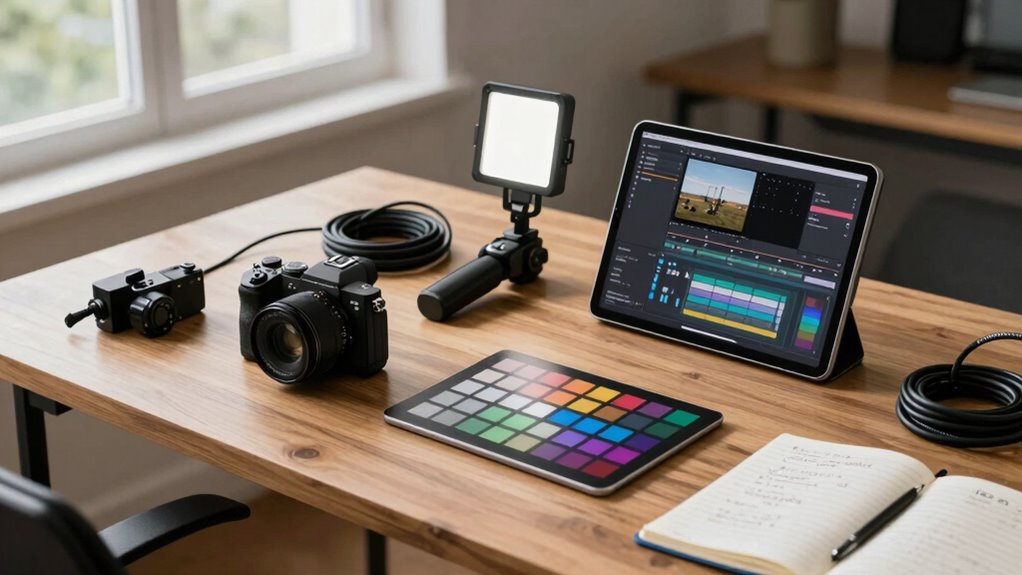
Planning a portable video kit can seem overwhelming, but breaking it down into manageable steps makes it much easier. Your goal is to create a setup that delivers clean, professional footage without adding unnecessary weight or complexity. To start, focus on essential components: a reliable camera, stabilization tools, lighting, and accessories. When considering camera stabilization, think about how you’ll keep your shots steady, especially when you’re on the move. A compact gimbal or stabilizer can make a significant difference, smoothing out handheld shots and reducing shaky footage that can distract viewers. This small addition helps elevate the overall quality and makes your footage look more polished. Additionally, choosing outdoor power tools like portable lighting or power sources can enhance your setup, especially when working in remote locations. Lighting techniques are equally important. Even in portable setups, good lighting can dramatically improve your video quality. Invest in lightweight, versatile lighting options like LED panels or portable ring lights that are easy to carry and set up. Use natural light whenever possible, but have portable diffusers or reflectors on hand to control shadows and brighten your scene. Understanding how to manipulate lighting on location helps you avoid dull or uneven footage and creates a professional look that stands out. Keep in mind that your lighting choices should be flexible and adaptable to different environments, so prioritize equipment that’s quick to deploy and adjust. To optimize your setup, consider easy-to-use accessories that streamline your workflow, such as quick-release plates or modular mounts. Next, pick a camera that balances quality with portability. Mirrorless cameras or compact DSLR models often provide excellent image quality without being bulky. Pair this with a sturdy, lightweight tripod or monopod to support your camera during static shots, freeing you up to focus on framing and composition. Don’t forget about audio—good sound quality is just as vital as visuals. Use small shotgun mics or lavalier microphones that are easy to pack and set up, ensuring your dialogue remains clear and professional. When assembling your kit, think about how each piece complements the others. For instance, a stable shot with good lighting will always look more professional. Practice using your camera stabilization equipment and lighting techniques in different scenarios to get comfortable with quick setup times. Proper organization of your gear can also save valuable time, so consider efficient storage solutions that keep everything accessible and protected. Ensuring your gear is durably constructed can prevent damage during transport, especially in rugged outdoor environments. Keep your gear organized in a dedicated bag with compartments, so you can quickly grab what you need without fumbling. This guarantees you’re ready to shoot at a moment’s notice, no matter where you are. By focusing on these core elements—stability, lighting, and ease of setup—you’ll develop a portable video kit that consistently produces high-quality footage, wherever your projects take you.
Popular right now

TCL QM64L 85-Inch QD-Mini LED 4K Smart Fire TV

Sony BRAVIA 5 85-Inch Mini LED 4K HDR Smart TV (K-85XR50)

Roborock F25 Ultra Steam Wet Dry Vacuum Mop
As an affiliate, we earn on qualifying purchases.
Frequently Asked Questions
How Do I Choose the Right Portable Camera for My Needs?
To choose the right portable camera, consider your filming needs and how comfortable it feels in your hands—camera ergonomics are key. Check if the camera’s size and weight suit your shooting style. Also, guarantee lens compatibility with your preferred lenses to expand your creative options. Prioritize features that match your projects, like stabilization or audio input, to make your footage cleaner and more professional.
What Are the Best Power Sources for Extended Filming Sessions?
For extended filming sessions, you should consider reliable battery options like high-capacity rechargeable batteries or power banks to keep your camera running. Solar chargers are also a great eco-friendly choice, especially in remote locations, as they harness sunlight to recharge your batteries. Combining these power sources guarantees you stay powered longer, reducing interruptions and allowing you to focus on capturing professional-quality footage without worrying about losing power.
How Can I Ensure Stable Footage in Unpredictable Environments?
Did you know 60% of shaky footage is caused by unstable setups? To keep your footage steady in unpredictable environments, focus on tripod stabilization—use a sturdy, well-anchored tripod or stabilizer. Also, add environmental shielding like rain covers or wind shields to protect your gear from elements that can throw off your shot. These simple steps help you capture smooth, professional footage regardless of surroundings.
What Storage Options Are Optimal for High-Quality Video Files?
You should opt for external drives and cloud storage to handle high-quality video files effectively. External drives offer fast transfer speeds and large capacities, making them ideal for on-the-go editing and backups. Cloud storage provides easy access and sharing options, ensuring your footage stays safe and accessible from anywhere. Combining both gives you flexibility, security, and efficient workflow management, so your high-quality videos stay organized and protected during your shoots.
How Do I Protect My Gear During Transport and Harsh Conditions?
Think of your gear like a delicate treasure needing a fortress. Use protective cases to shield your equipment from bumps and drops, and opt for weatherproof gear to guard against rain, dust, and extreme conditions. Secure everything tightly inside your kit, and consider padding for extra impact absorption. This way, you keep your gear safe and ready, no matter where your filming adventure takes you.
Conclusion
With the right portable video kit, you can capture professional-quality footage anytime, anywhere. Don’t let concerns about complexity or equipment size hold you back—modern gear is designed to be user-friendly and lightweight. Embrace the flexibility it offers, and you’ll find that creating stunning videos becomes much easier than you thought. So go ahead, plan your kit carefully, and start filming with confidence—great footage is just a setup away!